
gMail has a new structure for its inbox. The Primary tab is the one that opens first and is the most important because it contains your personal messages – as described previously – https://joanvinallcox.wordpress.com/2013/08/21/gmails-new-inbox-tabs/
The Other Inbox Tabs
The slightly altered image below is from (and linked to) Google Support – https://support.google.com/mail/answer/3055016?hl=en
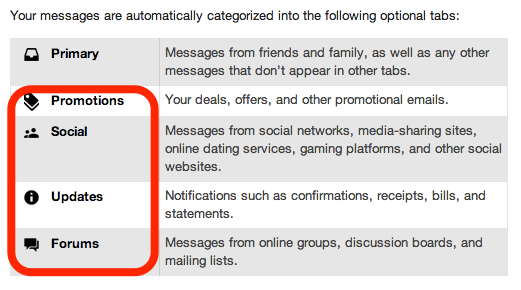
As well as the Primary tab, there are Promotions, Social, Updates, and Forums. Depending on your web activities you may only need some of them. For example, if you have set up a Groupon account, or other promotional sites, those messages will automatically go under the Promotions tab.
Here’s how it looks:
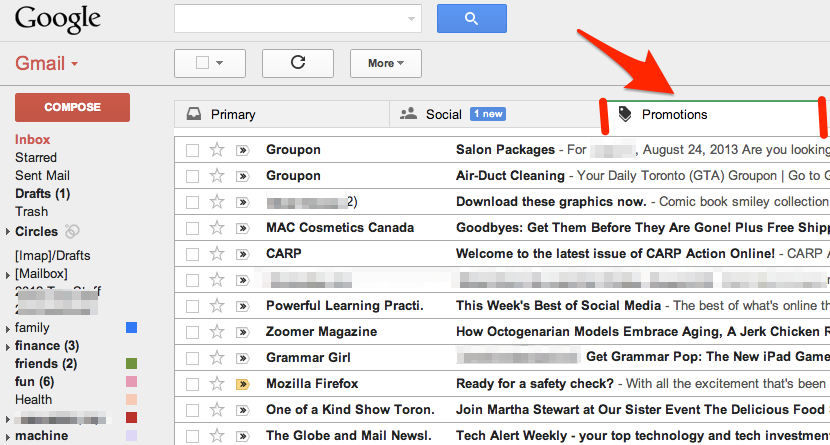
You can see the kind of messages that land in the Promotions tab. Remember, if you want messages from a particular source to land under a different tab, all you have to do is drag the message to the tab you want, and then, when “Do this for future messages …?” appears just above the tabs, choose “Yes”.
You may have noticed that I changed the order my tabs are in to suit my interests. I’m more interested in what comes in under my Social tab than what’s under my Promotions tab.
Another thing to notice, I have “1 new” message waiting in my Social tab. Each tab shows how many new messages are waiting for you there. Sometimes I want to know what’s in my Updates tab right away because I’m expecting a confirmation. Usually, I leave checking my Forums tab till I have some free time.
—–
Not finding the new tabbed inbox a good fit for you? I’ll blog about how to limit your tabs or even return to a single, tabless, inbox soon.
 Learning Living