
My 93 year old uncle inspired these posts on gmail’s new tabbed inbox. He didn’t want all the tabs; he just wanted the untabbed inbox. For him, like for many other people, the untabbed inbox fits their email needs, and gmail gives them information on how to set up that choice
All this information comes from Google Support – https://support.google.com/mail/answer/3055016?hl=en
How to return your gmail inbox to its untabbed state.
First, click on the + sign on the right of all the tabs –

Second, unclick all the tabs you don’t want –
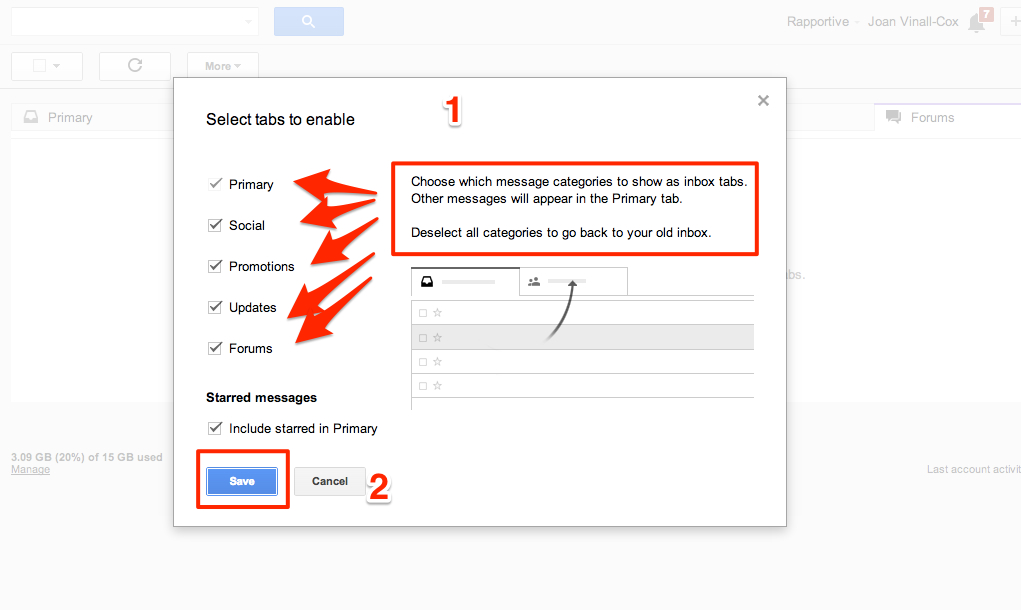
Don’t forget to click on “Save”.
And that’s it!
 Learning Living