As a longtime communications teacher, I am fascinated by our changing communications media and platform. And when I’m teaching, no matter the direct subject I’m teaching, I never lose awareness of the changes our culture is going through, and the responsibility of teachers to help prepare our students for this new and rapidly evolving communications environment. They will be swimming in it for the rest of their professional and personal lives.
What is often unnoticed is that in just over a century we have gone from having one way of recording, putting marks on paper, to multiple ways of recording, all more viscerally immediate than text. Photographs, recorded sound, moving pictures all speak more directly to our senses and emotions than squiggles on paper – which our minds must translate into meaning before we can have our sense and emotional responses. It is easier to think critically when text is what we are ‘reading’ than it is when we see and hear less mediated (so to speak) representations of the world we live in. We are now living in what Ong called “secondary orality” and that is what our students have been growing up in, and to a certain extent, what we grew up in too.
I have never known a world without photographs, radio and records, movies and television. However, text was still the dominant medium, at least in my educational experiences, for most of my early schooling, and mass media ruled. I looked, listened and watched, but I could only critique; I couldn’t participate.
Now I can sit in my study and produce multimedia, as in this blog post.
Vodpod videos no longer available.
The audio is poor, but understandable, and I’m combining text with video. I can embed other sites, like what I thought about this new multimedia platform that we can access using computers –
and I can link to other sites for readers/viewers who want to explore more of the educational possibilities – http://jnthweb.pbwiki.com/
and I can make movies using my screen –
Vodpod videos no longer available.
more about “Generating a Table of Figures in Word…”, posted with vodpod
There are other tools that I can use to create a mixed media text, and, here is the point I want to make:
We need to be teaching our students (technical and non-technical) how to compose using the expanding possibilities of the web as a multimedia, participatory communication platform!
udutu – The price is right, free if you don’t use their server.
udutu
It’s fairly straightforward to use –
udutu work screen
You can put it up on Facebook and learners can access it there –
My "course" on Facebook
The teacher’s view above and the learners’ below –
Self Assessment
I like udutu’s encouraging course creators to use the assessment tool for learners to self-assess, rather than scoring with it. It allows learners to repeat going through the materials as often as they want.
I like the ease of use with no coding, and only some figuring out needed. The small “course” I created took 2 to 3 hours and was based on a pre-existing PowerPoint, an udutu suggestion. That’s pretty quick for a first try.
I like the appearance, what the pages look like.
I have two provisos:
For a highly factual content course, it might be a good fit, but for a course with a lot of student input, the kind I usually teach, it could be too prescribed.
As the early WebCT did for me, udutu could provide a kind of scaffolding for teachers new to using the web in their teaching. However, having read Weinberger’s Small Pieces Loosely Joined – http://www.smallpieces.com/ – at an impressionable stage in my learning about the web, I prefer to use separate applications linked to each other. For my fall course, students will be using a class wiki, which will be linked to a class community blog, which will be, of course, linked back to the wiki. Within the wiki and the blog, there will be other links
to web applications needed to complete the course
to tutorials and information about those web applications
to student-chosen links
to assignments
To me, this is the most efficient way to set up a class, and it matches the overall web culture, as I understand it. Students will be living, learning and working in that culture in their futures, so why put them in a tight framework in this part of their learning.
So udutu might work for some purposes, but not for my current ones.
For years the fountain pen, such a wonderful development from the straight pen, ruled the writing world. For years the typewriter gave our paper communications the professionally neat look, before the personal computer made it redundant. The laptop taught us that we could carry our composing/working tool around, maybe not as conveniently as a pen and some paper, but we could be mobile. However laptops are not small and are too expensive for many casual users of the computer basics: a little writing, a little calculating, a little web browsing. However a tool is emerging for younger students and those who want only the basics from a computer: the mini notebook.
From forum.notebookreview.com, with markings added
I’m home again from the MERLOT Conference in Minneapolis, Minnesota, and found it exciting for a number of reasons, especially as it was the first academic conference I’ve ever attended that had a strong focus on the importance of web 2.0 for teaching and learning. I think the MERLOT members are ahead of many other educators because they are most concerned with distance learning, and the possibilities of web 2.0 are really useful in making online courses rich and lively.
Here are some of the presentations I attended:
The 12/10 Conspiracy: Guiding Faculty and Staff Exploration of Web 2.0 as Learning Tools – Fritz Nordengren gave a highly polished performance using the 12/10 tarradiddle as an amusing shell for valuable suggestions about how to encourage exploration and adoption of web 2.0 applications to support learning and teaching. I found his reference to the PEW Typology of Information and Communication Technology Users especially helpful. I agree with him that people have individual needs and often require individual coaching, and that we are still defining what the basic technology skills are. Very enjoyable and informative.
ZSR Library Presents: Blogs & Wikis @ Wake Forest University – Susan Smith, Lauren Pressley and Kevin Gilbertson, from the MERLOT 2008 program:
Blogs and wikis are valuable communication and educational tools. These technology-enabled instruction tools can supplement or replace the traditional LMS. To provide the faculty with 21st Century educational tools, Z. Smith Reynolds Library offers locally hosted blogs and wikis for classroom use. This service supports the university’s academic mission, as well as allows the library to fulfill its mission of collecting, indexing, and preserving local content. To create a successful program, library staff integrate instructional design and technology training for faculty. This presentation will provide a program overview, explanation of the instruction, and the specifics of the open-source technology implementation.
I like their approach of hosting WordPress – http://mu.wordpress.org/ and MediaWiki http://www.mediawiki.org/wiki/MediaWiki installations on their server for multiple accounts. WordPress is a highly regarded free blogging application; I use the WordPress.com account myself, while theirs is the WprdPress.org version. MediaWiki is the wiki used for Wikipedia; I prefer wiki applications that are totally WYSIWYG while MediaWiki requires some wiki coding. Intelligent and interesting presentation. Talking with Technology: Asynchronous, Synchronous Communication and Beyond Using Free Software – Takako Shigehisa. Of special interest to teachers and learners of languages. In this excellent presentation, the following applications were introduced: Audacity, which I use in my own Oral Communications course, Photostory3, Skype, Powergramo, and Chinswing, plus Gizmo Project, VoiceThreads and iVisit – A rich selection of very useful teaching/learning tools. Facebook and Podcasting: Convergence for Freshmen – Peter Juvinall suggests going where the students already are:
Facebook provides a unique opportunity for educators in that it enables a convergence of communication technology. This presentation will cover the benefits of using Facebook as a classroom management solution, the lessons learned from a freshman-level class, and a proper approach to using it in a classroom environment in conjunction with podcasting and traditional means of classroom communication.
Interesting approach, although I’m not sure I’d want all my students on my Facebook account, and not sure they would want me on theirs. Juvinall, however, makes sophisticated use of Facebook Groups and other possibilities. Very interesting and student-oriented approach. eLearning Strategic MERLOT – Robbie Melton is an amazingly skilled speaker, and I found her strategies fascinating and practical. As the chief academic officer for the 5th largest system of education in the USA, with a 29% increase in online learning this year, she has her institution use MERLOT as an integral part of faculty development. As a teacher of rhetoric, I was deeply impressed by her speaking skills, and personally envious. As a teacher educator, I admired her sensible approach for involving both teachers and students using MERLOT. Wikis and the Pressure of Public Writing – Dorothy Fuller case study on having groups do collaborative research and writing using wikis was very valuable. Her description of how inhibited people are when editing other people’s text, matched my own reactions to using wikis. This is an important aspect to using wikis for collaboration; we, as a culture, have to learn the ‘skill’ of sharing writing tasks in a public space. An informative piece of research. Web2.0, the Social Media and Academia: Using Personal Learning Environments to Expand Teaching and Learning – my presentation – described by blogger Lauren Pressley http://laurenpressley.com/library/?p=623 She kindly didn’t mention the technical snafu when the Hotel Hilton’s irritatingly weak wireless system caused my computer to crash, leaving me to talk through the last third instead of showing. My PowerPoint can be found on SlideShare here – http://www.slideshare.net/vinall/merlot2008-vinall-cox-j-presentation
MERLOT (Multimedia Educational Resource for Learning and Online Teaching) is an interesting organization, made up of people from a variety of disciplines, focused largely on distance learning. It is the first academic conference I have attended with a strong focus on the use of Web 2.0 in teaching – something I’ve been looking for.
So I’m here in Minneapolis, where I admired the architecture Wednesday, and I’ve been attending sessions since then. Darcy Hardy was a good and interesting speaker yesterday morning, talking about online education, leadership, and success. She shifted my attitude on distance education and online learning.
The session, MERLOT Introduces Web 2.0 Friday morning, demonstrated the new MERLOT social network, set up on Ning, called MERLOT Voices.
This should give members a place to play with/in a social site and connect with others of similar interests. MERLOT Voices combined with the resources of the original MERLOT website, gives teachers access to a huge repository of teaching resources.
In No More Traditional Classes, Dr. Dan Lim looked into a future where iPhones would be part of mobile learning, and game-based education would be far more common. Michael Scheuerman, in Report on a Longitudinal Study – comparing synchronous and asynchronous elements in online courses, came to the interesting conclusion that synchronous elements required less faculty time than asynchronous.
Neil Griffin described a number of examples of free software available to teachers (or anybody). He mentioned exe for learning packages, Match-up for quizzes, Audacity for audio recording, Media Coder for converting file formats, – and others.
Saturday started with a plenary with Bernie Dodge, the originator of WebQuests, speaking on “What Would Dewey Do?” His thesis was that technology is where our society, and our students, live now, and what they need to learn about experientially. As I’ve used the concept of WebQuests since the late ’90s, I was delighted to meet him in person. What he had to say about the Web 2.0 environment and teaching and learning matched my views. I, too, see wikis and podcasts as very useful learning tools, and VoiceThreads, but, like Dodge, am not sure of Second Life which seems to demand too much energy for the technical details, leaving not enough for the content.
I’ve attended Web 2.0: What is it and why Use it? which was a good basic introduction and VR3 – Virtual Reality: Vehicle for Recruitment and Retentiondescribing East Carolina’s experience of having a virtual campus and classes in Second Life, another introductory taste of a tool.
So far, I’m having an interesting and educational time. As often happens at a conference, my informal conversations are among my richest learning events, whether I’m talking to young web, learning and graphic designers in a Japanese steakhouse, vendor reps at lunch, or other teachers at coffee breaks.
I’m looking forward to the rest of the conference.
I head out tomorrow for the MERLOT International Conference in Minneapolis, Minnesoda where I will be presenting on Web2.0, the Social Media, and Academia: Using Personal Learning Environments to Expand Teaching and Learning. (The description is second from the bottom here.) I am asking for some help in proving my point – that creating your own Personal Learning Environment is essential for teachers and other knowledge workers.
I’ve worked up a PowerPoint with many links to many free applications and images of what a PLE actually is, but I want to show its value during the presentation. I received some important help in my learning from comments when I posted on Visual Literacy here, I’ve received help from responses to some of my Twitter postings, as you can see here, and someone (sorry, I can’t remember who) pointed me to http://aquaculturepda.edublogs.org/2008/07/19/listen-to-the-wisdom-of-your-network/ – which has really inspired me. I really like Sue Water’s use of the phrase “Personal Learning Networks”, and I’m imitating some of her approaches, and this is where you come in.
Please help me show the power of Personal Learning Networks by responding to some or all of the following requests:
Add a comment to this post mentioning any part of your own PLE that other teachers might find valuable;
If you are on Twitter, follow me, and when I ask for responses, use “Reply” so I can show how the network can help almost instantly; and/or
If you have some ideas that might help, “Direct Message” me in Twitter.
I’m presenting Sunday, August 10 at 11:45, Central Daylight Time – an hour ahead of Eastern Daylight Time. (It’s 8:30 near Toronto, and 7:30 there.)
So I’m requesting your help, and, in return, I will post some version of my presentation after the conference is over and I’m home again. So thanks in advance.
In the past few days I’ve been alerted to two new search tools. A friend, knowing my web-fascination, sent me a link to Cuil – http://www.cuil.com/info/ – I have only briefly played with it, but the information has hit the Twitterverse, and it was created by Google alumni, so you might want to check it out.
Searching for Vygotsky
The other search tool I found out about from a comment from someone called Sasha on my blog. Chunkit is still in beta, you have to add a small download – Windows, Mac & Linux, IE 6.0+ or Firefox 2.0+ – but I found the Chunkit videos and information intriguing enough to download the application.
Searching for Vygotsky 2
When you click on the most interesting text on the left, you are taken to the source site with the relevant text highlighted:
Source site
This looks like a handy research tool to me. I found the videos helped me learn how to use Chunkit, including the Search Options –
Chunkit Search
I have 3 small criticisms, less to more important:
the colours, orange and black are Hallowe’en colours – ugly;
The toolbar takes up a chunk of my small laptop screen; and
the education-oriented videos are all oriented toward the partying, last-minute essay writing, and one almost suggests plagiarism – inappropriate.
However, some of the videos have pages attached, like this one on Gutenberg for those who want a static set of instructions. The abudance of videos for many purposes, household, shopping, news, academics, and business, make it easy for the viewer to dip into the different uses he or she might make of Chunkit. After sampling a few, I found it easy to navigate Chunkit, and to use it for my purposes.
Chunkit PLE
So what do you think? Are either of these a helpful addition to your searching? One more than the other? I interested in how others see them.
Summertime is playtime, and we’ve had record amounts of rain where I live, so my playing has been indoors. Here are a couple of tools I’ve been playing with.
Jing is a free and very easy screencasting tool. Because I’m thinking about Personal Learning Environments, that’s what I made this screencast on –
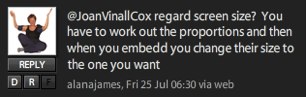
My problem is that by covering my full screen, I get a screencast the size of my full screen, which is too big. Twitter helped me get a partial answer. (I’m using TweetDeck because with it, I can see any replies immediately and I can separate the people I follow into different groups, for ease of following conversations.)
From TweetDeck, Alana James answers my request for help.
Alana’s advice allowed me to reduce the size of my Jing screen, but it only showed part of what I had captured. I wanted the whole image, but smaller. I have asked for help on Twitter several times previously and most often got a reply, so I consider it an important part of my PLE. It’s a place where I can ask and answer questions from peers.
So I’m playing, and thus learning how to use these tools, so when the weather is sunnier and/or I’m busier, I’ll be proficient and efficient in using them.
What is visual literacy and is it different from visual thinking? I’ve been pondering that for a while now. I have absolutely no training in art or any form of visual literacy. I assume, I hope with some degree of accuracy, that visual literacy means, in parallel with textual literacy, knowing the history and current usage of images and colours so you can interpret them within a community of knowledgeable users. As I said, I’ve never studied art or visual stuff, but Jay Cross says 80% of learning is informal – and that’s where I’ve learned anything I know, visually.
Jay Cross on Informal Learning
My informal learning sources have been
my genetic mix: I love colour but have a kind of dyslexia with maps and other wholistic, non-linear images;
my ongoing attempts to understand visuals both moving and still;
my husband, who studied film, including art, at BU, and continues to read and explore museums and other visual worlds;
colleagues who have formally studied art and/or graphic design; and
So I’m a autodidact in visual content, kind of in the position of “I don’t know art, but I know what I like.”
And what I like is simplicity and contrast. When I look at Jay Cross’s graph on informal learning, above, I can understand the information immediately. When I was early into the web and both Yahoo and the upstart Google were young, I chose which to follow by appearance.
Early Yahoo & Google
For me, there was no problem choosing – I went to the visual simplicity of Google. I found the Yahoo page overwhelming and confusing. But I don’t think that’s visual literacy; I think it’s just the way my perception works. Other people may well prefer the complexity and detail of Yahoo’s page.
Currently I’m working on preparing a presentation for MERLOT in August so I’ve been looking at what’s online about PLEs, (Personal Learning Environments) – part of my topic. I found this wonderful wiki filled with visualizations of PLEs – http://edtechpost.wikispaces.com/PLE+Diagrams My favorite is Dave Tosh’s –
Dave Tosh's PLE
I like it because he uses icons and different shapes to help convey the meaning, before text comes into play. I like the contrasts and repetitions that help me sort out the information. Whenever a representation simply positions relatively similar shapes filled with text in different parts of the page, my dyslexia kicks in and it’s so much work to decipher it, that I give up unless it’s really, really important to me.
However!
That’s not the whole story (or even very much) of my take on the importance of visual thinking. Even we visual illiterates can use visual thinking, which I take to mean sketching and laying out information visually as a form of drafting, as part of composing. Mostly when I write, I just start writing, letting my words lead me to a structure that I then use to shape the second draft. Even outlines with their phrases and indenting didn’t work for me. I was solidly text-based, figuring out what to say by writing, sometimes in journal-style, without worrying about correctness or structure. Then I would mine this ore for the thoughts I wanted to shape and present to readers.
Over my adulthood, the culture has become much more visual. Over the previous century photography, visual and audio recording, and the increasing use of graphic design have led to our receiving more information visually. Visual composers use sketches and storyboards; they think visually. Even text-based people now add images to their written pieces, use PowerPoint, and sometimes venture into short videos. Plus, with the advent of the possibilities of word-processing, text has also become a visual experience that affects how people read.
When I started preparing the PowerPoint expected for my conference presentation, I found, as I have previously, that I was having trouble writing my way into composing my content for a visual medium. I needed to do something visual to help me compose my presentation. A delightful coincidence occurred. I was inspired by Michele Martin‘s PLE mindmap.
Michele Martin's PLE Mindmap
and in my Twitter explorations, I discovered Wisdomap. Michele’s inspiration and the stumbling onto a new web app to play with led me to create my own current PLE mindmap –
Joan Vinall-Cox's PLE
And here’s what the whole Wisdomap screen looks like –
The Wisdomap Screen
I really like the added features – I can attach videos, images, files and sites to my mindmap for a richer collection of information. And, when I had some problems with this beta app, they responded quickly and sorted out the bugs.
So I’m thinking with visual tools; both my Wisdomap page with my PLE mindmap and associated materials, and my PowerPoint presentation allow me to think visually.
However, I believe this doesn’t mean I’m visually literate, just that I can (and need to) use visuals in my composing, in my thinking. Peter Elbow, I think, wrote that the person that benefits most from writing a textbook, is the writer him or herself. Even poorly written textbooks (and there are many) make the author think through the information and put it into context, thus learning it more deeply. Writing is a way of learning. Writing theorists universally encourage the keeping of journals and engaging in free-writing, informal writing, to think with and learn through. I think learning the habit of informal visual thinking is an important addition to free-writing as ways of thinking and learning.
Using visual tools to think with, using them informally, is increasingly a neccessity in this increasingly visual age. You don’t have to be visually skilled and/or literate to think visually informally; you just have to figure out what works for you and find those tools.





 Learning Living