
Skitch – An Easy Tool for Pictures – Macs Only

Skitch Beta, a Mac application, is free and a lot of fun. It’s almost worth buying a Mac just to get a copy;-> I’ve been using it to add pictures to my edublog – here and here. It works well with Flickr, my photos, and screenshots. Unfortunately, it isn’t available for PCs yet.

You can see the screenshots that I simply dragged onto Skitch, which made them .jpgs, and the two places I could either click to drag the image onto the desktop or another page, or with two clicks get a Skitch webpage opened – and simply click to copy and paste it into the post using Blogger’s image icon
To learn more – go here – http://skitch.com/ – and request your own version – if you are on a Mac.

Hacking Mail Accounts

I heard a disturbing story today from a friend. She has a Yahoo mail account, or rather, she had one. Someone hacked into it and sent emails to everyone in her contacts list. I can’t remember if she said all her files were destroyed as well; we were both rushing in different directions.

All her contacts got an email starting “Hello Dear” which her kids immediately recognized as a fraud because she never uses that kind of phrase. The email continued, telling her contacts that she was stranded in Africa, and where they could send the money she needed to get back home.

I don’t want to increase anyone’s paranoia, but that level of fraud is pretty scary. My friend is a smart lady, and she took action immediately, but it has caused her a lot of trouble and anxiety. I don’t know what would allow that kind of security breech. Does anybody know how to avoid that kind of hacking?

A Wiki Showcasing Web 2.0 Learning Tools


releasethehounds – http://releasethehounds.wikispaces.com/ is a wiki aimed at teachers and showing what can be done, by teachers and by students.

Among the tools it showcases are VoiceThreads, – www.voicethread.com – YouTube, – http://www.youtube.com/watch?v=ZZfqOTWQCuA – and SlideShare, – http://www.slideshare.net/charbeck1/scribepost-119097 – all free and fairly straightforward to learn how to use. All both audio and visual.
Courtesy of the prolific and generous Stephen Downes‘s OLDaily

Another Brain Backup – Backpack

I have been using the free version of Backpack for years. It’s especially handy for reminders, where I can set up a reminder to be emailed to me regularly. For example, I get a monthly reminder to check my bank account so that an automatic monthly withdrawal won’t cause me to be overdrawn. I get my monthly reminder in my inbox, and I haven’t had to worry about forgetting since I started using Backpack.

Now it has some new stuff making it even more interesting and useful –
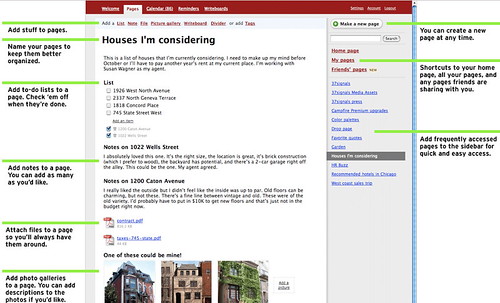
Backpack
http://www.backpackit.com/tour

This is a remarkably versatile and easy-to-use application, and I suggest you add it to your Bookmarks Toolbar, and make it part of your personal learning/work environment, i.e. keep it always handy!

I’m still playing with Jott, which I posted about yesterday, and have found some problems with it, which I’ll cover when I get a message back from them.

Jott – Another Fun Application

My friend, Bob Collings, sent me a link to Jott a new application still in Beta, that is very interesting. You phone their number, tell them who you want to leave a message for, including yourself, speak, and Jott emails your message to you or any of the contacts you’ve named. It is absolutely simple and requires no technical knowledge at all!


It’s good for reminders, to do lists, and recording ideas, as well as messages. I’m going to play with it and see how it works for me.

Mapping Wikipedia

Teachers who want a way of introducing their students to a new topic may find it useful to use WikiMindMap to create a mindmap to introduce the subject, and as a quick way of getting basic resources into the hands of students. Mindmaps are especially useful for visual thinkers and those starting to research an area. John Dewey is one of the most important writers on teaching and learning, in my opinion, so I put his name into the search box, made sure that I was using the English Wikipedia, and got this –

Under “Select a Wiki”, make sure you select “en.Wikipedia.org”; the default is “de.Wikipedia.org”, which finds German results. The green circling arrows are direct links, and the plus signs can be opened out for further links. At this point WikiMindMap is in beta.

I had a lot of fun seeing what I could find through it.

via Tris Hussey’s A View from the Isle