The Growing Impact of Web 2.0


Alja Sulčič describes the impact of web 2.0 on her daily activities, and suggests some questions arising from the changes the read/write web is bringing.

I’m really amazed at what big part Web 2.0 plays in my life (and I in its life). In just a few years it has entered our lives from different doors and it’s growing stronger and more powerful days by day. And for this reason I agree with what Michael Wesch pointed out in his video – we really need to rethink a lot of things. Among these things I think that rethinking ourselves is one of the key points. We are being linked in previously unthinkable ways and our lives are being changed. What kind of changes is that bringing us? Are the changes improving our lives or crippling the social aspect of our analogue real lives as some fear?

The answers to these questions are many – and there should be. For me the most important changes are the feeling of connectedness, the feeling of responsibility, the need to share and the trust systems that the users of Web 2.0 are building among each other (just take for example Wikipedia). These are the changes I find most valuable and that I hope I (and others) will be able to keep and use not just for a better and more useful Web 2.0, but also to build a better future – together, by connecting are ideas and constructing new worlds.

If you want to understand more about how web 2.0 is affecting people, both young and old, I recommend the whole post – http://ialja.blogspot.com/2007/02/living-web-20.html – and the comments.

Image – “Open Clip Art Library/Clip Art.” Open Clip Art Library. 24 Feb. 2007 .
eLearning Explained

If you aren’t sure what eLearning is currently, and want to have a richer understanding, I recommend Tony Karrer’s post on it – What is eLearning 2.0? – http://elearningtech.blogspot.com/2006/02/what-is-elearning-20.html

We are in the midst of the biggest change in communications since the printing press, and it is affecting both the methods of teaching/learning, and the content. We need to learn what we can, and use it when we can.

eLearning Technology: K-12 Blogging, Wiki and Social Bookmarking Resources

eLearning Technology: K-12 Blogging, Wiki and Social Bookmarking Resources
I suggest Wikispaces – http://www.wikispaces.com/ – which is free for K – 12, and can be made private so only (class) members can see it. It also has a (WYSIWYG) visual editor that is similar to a ‘lite’ word-processing application, and therefore very easy.

I also recommend Elgg Spaces – http://elggspaces.com/features.php – &/or Elgg.net – http://elgg.net/ – because blogging and friending and Community Blogs and lots of other wonderful social things are free there, plus it’s an academic environment where each person can set their own privacy (or not) level. As well, I believe people (teachers) can set up free (private) group blogs in Blogger.

I recommend she explore my blog WebToolsforLearners – http://webtoolsforlearners.blogspot.com/index.html – where I post about useful, free tools for teachers and students.

Engrade – A Wonderful Teacher’s Tool


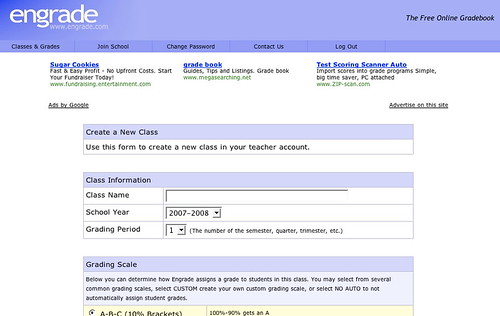
Engradehttp://www.engrade.com/ – is a wonderful teacher’s tool. If you want to share marks with individual students privately online, and aren’t on a Learning Management System like Desire2Learn, Moodle, or BlackBoard/WebCT, Engrade is just what you need. With Engrade you can post your students’ marks, and they can use the password you assign individually to see their marks. Plus you can then download your class records into an Excel worksheet and save them there.

It’s free and straightforward. You set up a class, add the students’ names, and give them their own individual password, (I did that by email). When you’ve finished marking an assignment, you add the marks to Engrade and make them accessible.

I used it with my 3rd year university students last term and it worked just fine. They checked their marks, I got some emailed queries, but I simply answered those, and found it far smoother than discussions about marks in class. Some after-class conversations still happened, but most students were happy with the system – if not the marks ;->

The best thing was that they had adjusted to their marks before they got their assignment or assignment comments back, and, when they got them back, could focus more on my feedback and less on the mark.

SlideShare on Blogging

I’ve mentioned SlideShare, the YouTube for presentations, before – http://elgg.net/vinall/weblog/134207.html  I like to browse it sometimes  and just read what I find. Dr. Steven Warburton has put up an interesting set of slides on student blogging – http://lookleap.com/slideshare.net/a1 – I recommend it, and using the full screen mode.

I found it quite interesting, a bit different from mine.

I used an Elgg Community Blog which gave my students some control over how public, or not, their post was, set topics, often based on current readings, and required they write in it for a portion of their marks. Oral Rhetoric was classroom based, but the frequent writing paired with personal icons, either their photos or a chosen image, created a kind of threading in which we could, with a quick glance, see who the writer was.

The setting of weekly questions scaffolded the students in learning how to use a blog, which many, if not most, were uncomfortable with, especially using it for an educational purpose. As I believe they will sometimes be using blogs for professional purposes in their futures, I wanted them to begin to understand that there are different genres of blogs, and different rhetorical approaches – which I’ve explored here,

I wrote up my opinion of blogs used as part of a learning / teaching strategy – http://elgg.net/vinall/weblog/145563.html  – I believe that that blogs can be used in many ways, and that they are especially important in creating learning communities.

technorati tags:,

Blogged with Flock

Free Applications for Education

From the blog  – AcademHack – http://academhack.outsidethetext.com/home/?p=51 – a list of tech tools for academics. The two I liked the looks of best are NeoOffice Aqua  – a free suite of office tools for Macs (For Windows, there’s OpenOffice, also free) and Google Apps for Education which is downloadable for free.

With Google Apps for Education, you can offer all of your students innovative email, instant messaging, and calendaring, all for free.* You can select any combination of our available services (see below), and customize them with your school’s logo, color scheme and content. You can manage your users through an easy web-based console or use our available APIs to integrate the services into your existing systems — and it’s all hosted by Google, so there’s no hardware or software for you to install or maintain. Find out more by reviewing detailed product information or attending an online seminar.

Google Apps for Education

I hope some educational administrators take advantage of this time-limited offer.

technorati tags:, ,

Blogged with Flock