Are Blogs a Genre, or, Are there Genres of Blogs?

What do readers of blogs expect? Do they expect a certain kind of prose? Do they expect images? Is (Are) there (a) distinct genre(s) visible in blogs?

An interesting site – Introduction to Genre Theory – although it’s chiefly about the audience construction of T.V. genres has this to say:

Constructing the audience

Genres can be seen as involved in the construction of their readers. John Fiske sees genre as ‘a means of constructing both the audience and the reading subject’ (Fiske 1987, 114). Christine Gledhill argues that different genres ‘produce different positionings of the subject… Genre specification can therefore be traced in the different functions of subjectivity each produces, and in their different modes of addressing the spectator’ (Gledhill 1985, 64). And Steve Neale argues in relation to cinema that genre contributes to the regulation of desire, memory and expectation (Neale 1980, 55).

When I post to my blog here, or my personal blog in ELGG, I try to ensure that my tone is casual and I don’t use too much theoretical terminology. (Today is an exception, or a new trend. I haven’t decided yet;->) I do, however try to keep my spelling and grammar correct and carefully gauge how much personal information I include. I might get a bit more theoretical in the ELGG Pedagogical Impact blog and a little more impersonal. All these writing behaviors have emerged for me from reading other educationally-oriented blogs.

However, when I lurk in MySpace I see a very different blogging style and tone. It’s much more casual about correctness, and much more revealing of personal information and narratives. Interestingly, it’s also professional in its own way, as bloggers post information about performances and other things they wish to find an audience for. I see it as a different genre of blogging, a more social and youth oriented one.

So my current take on blogging is that it’s a collection of related but distinct genres, evolving and taking firmer shape as more people read and write blogs and enact their expectations.

A Screencast on Educational Blogging

Wow! This screen cast really covers what you need to know to engage in educational blogging. Courtesy of Stephen Downes. Uses a big bandwidth and Quicktime – a free download, with Quicktime for Windows on the bottom left.

Check out Brian Lamb’s Beyond Blogging screencast if you’re thinking about using blogs educationally. He shows you what is possible and what is needed.

tags

The Lingering Impact of Old Technologies

OR

Which looks better, the underlined heading or the bolded and increased-size heading?

I insist my students use MS Word’s Styles to set their headings. I further insist that they not underline their headings. When one student spoke up and complained that she had been taught to underline headings all the way through high school and she thought it looked better that way, I found myself explaining my reasons.

  • Graphic designers generally agree that underlining doesn’t look good or increase readability.
  • Most people now associate underlining with linking on the web, not with headings.

And most importantly

  • Underlining titles is a remnant of an antique technology – typewriters – where the only way you could signify that something was a heading was to move the paper backwards and add underlining to the words of the heading. You couldn’t bold or increase the size; you could only underline.

So my student had had her eye trained to accept underlining as signifying a heading, and what she is actually signalling is that she isn’t effectively using the flexibility of the new technology of word-processing to communicate visually. And people read this kind of information at a close to subconscious level, so she, and others, are actually signalling the lingering impact of typewriters and their resistance to learning the new technology of word-processing.

tags


U of T versus Google

In the fall 2005 issue of University of Toronto Magazine, Devin Crawley (MISt 2004) writes an article called The Infinite Library in which he looks at the changes in academic libraries, in particular, U of T’s. What I found fascinating was his decription of how Google is influencing universities’ digital collections, and how access to those collections is changing.

Google Scholar has been, he says, a wake-up call.

Google Scholar, a service started late last year that’s still in its testing phase, is the company’s first foray into academic research. It allows users to search collections of proprietary electronic journals and a variety of online repositories of scholarly papers. A Google Scholar search on “exosolar planets,” for example, returns 54 academic essays on the subject, ranked roughly in order of the number of times they’ve been cited. Within just a few months, Google Scholar has established itself as a rival to powerful multinational companies such as Thomson and Elsevier that offer huge (and, for libraries, hugely expensive) databases of scholarly material. Some librarians say that Google underperforms its rivals in the currency and quantity of its search results, while others declare that its simplicity is a huge advantage. “Google Scholar works. And it works in a way that presents very few of the hoops that we make students jump through to use our library databases,” writes T.J. Sondermann, an academic librarian and prominent blogger on library issues in the U.S.

The web makes information infinitely easier to find and store. Some librarians quoted by Crawley think the generalist search role should be ceded to Google; some see Google’s for-profit status as compromising it as an academic research tool. In any case, the impact on students’ research behavior of the sheer ease of searching with Google has led to all of Ontario’s universities working together to develop

the Ontario Scholars Portal, a single-box search engine that covers 7,300 electronic journals and 65 electronic indexes. … the library is about six months away from its ultimate goal of tying its print catalogue, databases and catalogued Web resources to a single search. He admits that Google is innovating quickly, but says that libraries – and the electronic database vendors whose products they buy – are beginning to catch up.

It is an exciting time to do research, as more and more kinds of information become accessible and as research skills and tactics change so rapidly!

tags


Blogging and Writing Courses

I have just found my way to bgblogging, Barbara Ganley’s insightful blog on why blogging is important. She says –

If we want to encourage our students to use blogging as a powerful communication tool, we have to teach them the difference between blogging as daily diary, and blogging as a way to dig deep into ideas and to grow communities of discourse, of knowledge and of action. So, of course it isn’t simply a matter of handing blogs to students as they enter our institutions and saying, go ahead, write; you have to give students a chance to grow in this work within a learning community–the new wall-less classroom–and then turn them loose to develop their own blogging practices within a supported framework. The institution and its faculty must mentor and model this practice of reaching out in the world to discuss and share ideas, ask questions, and work collaboratively. In other words, it is in the second-wave blogging, the blogging that my juniors are doing out in the world as a way to express, explore and understand the world in which they have been thrust that will teach them huge lessons about the role of communication, of technology, of community in bringing about change in this stumbling world. Indeed, I think that they are achieving what George Seimens, in a recent post, is calling learning ecologies:

The whole article is worth reading; I recommend it.

tags

Bloglines & "Portrait of a Digital Native"

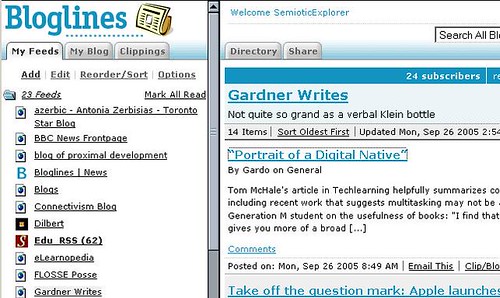
Tom Mchale’s article in techLEARNING gives an interesting glimpse into how students are using technology currently.

Meredith Fear sits in her room doing her homework. Books are scattered about, and a computer monitor glows before her. She is working on two Word documents and has four Web sites open. She checks her school e-mail account, her Bloglines news aggregator, and Furls of an online article for her independent study. She quickly transitions from this to respond to group members on Instant Messenger who have attached PowerPoint slides for an upcoming class presentation.

“The computer gives me a contact to all the people I need to talk to,” Fear says. “It’s a gateway to the world.”

McHale specifically refers to Furl, which I have written about previously,
and to Bloglines, another of my favorite applications.
bloglines
Bloglines is a news aggregator that you can set up a personal account on for free, which makes it popular with students, if they know about it. It is also popular with bloggers and teachers who have their students using blogs for some assignments.

Once you set up your account, you add the blogs and/or sites you like to follow regularly. Then you can go to one site and get caught up in your web reading. The bolded sites have new material since the last time you went on bloglines, and the number in brackets after show how many new posts.

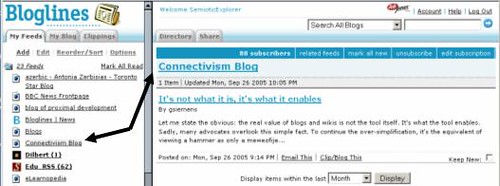
bloglines2
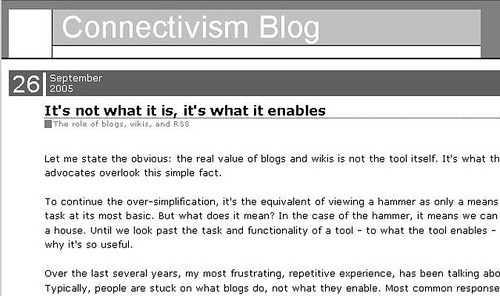
Once you click on a site, you can read the beginnings of the article on the right. If you are interested in it, you can click on the link, and go to the actual site or blog, here George Siemen’s Connectivism Blog.
blog3
Bloglines is a very useful tool for the learner using the web as one of their learning tools. Try it, or another news aggregator out;->

tags


The Blogsphere: A New Discourse Community

I run this blog for two main purposes. One is to become part of the blogsphere and learn more about this new discourse community by joining it. My second, and perhaps dominant purpose, is to have a content thread to follow while allowing my teacher persona to play; I hope to connect readers to the wonderful tools and possiblities being created on the Web. (Sometimes called the Social Web, sometimes the Read/Write Web, or the Web 2.0 – these at least overlap even if the names are not completely synonyms.)

This is a leadin to my excitement at appearing in other blogs! It is also a report on how the blogsphere has worked, making connections with/and for me.

Konrad Glogowski, in his Blog of Proximal Development, referenced my College Quarterly article on Teaching Writing in the Age of Online Computers and linked to my Elgg weblog. I wasn’t aware of this when I received an email with some very nice feedback on my article from Gardner Campbell. He mentioned Konrad’s blog. I already had it on my Bloglines account, so I went immediately to it and read Konrad’s post.

I found his discussion of “nodes”, his references to Prensky’s term “legacy content” and to Siemen’s connectivism to be fascinating, and a fruitful extension of what I have been thinking about. Then I recognized Gardner Campbell’s name, and followed Konrad’s link to his blog – Gardner Writes, and I discovered that he had referenced and quoted my article!

I have, of course, added him to my Bloglines, and I continue monitoring and responding to these conversations that feed and extend my interests. I am part of this small corner of the blogsphere!

tags


Scavenging on the Web

Again I sat down on this Saturday to prepare my Monday and Tuesday classes, and ended up spending my whole afternoon scavenging on the Web. I should avoid checking my email first, because that’s where I get distracted. A message was waiting for me from www.webtools for Education so I started to check out what was offered. One site led to another. Some I bookmarked, using Furl. Some I emailed the links on to other teachers who might have an interest in their content. Some I simply read through.

Then, already in that rhythm, I opened another email, Stephen Downes’ OLDaily – a newsletter on the educational use of technology that comes out every weekday. Again I scanned, bookmarked, forwarded, and read. I was three days behind in reading my OLDaily messages, so I checked through the ones I hadn’t got to yet, scanning, bookmarking, forwarding, and reading. At least I didn’t go to my Bloglines account where I have over 20 blogs aggregated. I could have spent another couple of hours going through what was new in my collection of education and technology blogs. What a way to avoid getting down to my lesson preparation!

Before I get too hard on myself, I have to look a bit more deeply at what I’m actually doing. While it’s true I had intended to think through my lesson and create the Web pages needed to direct my students in class and for their homework, I can still do that tomorrow afternoon. What I did today was research. Not organized, pre-planned research, but scavenging through the massive influx of information that the Web provides.

And it is scavenging! I find Web sites that I can link to the Web pages I prepare for my students. I’d rather find and share information and instructions than recreate them. (I think my students benefit from seeing how much they can support their own learning by finding helpful sites on the Web.) I find Web sites that I can send to colleagues, and thereby keep in touch with them. I find free Web tools that allow me to expand what I can do without spending more money than I’ve already spent on my computer, the broadband access, and the propriatory software I use. I also find information about teaching theories and practice. I learned a lot this afternoon, as I always do when I research by scavenging.

tags

Free WYSIWYG Web Creation –

I haven’t used <MySource> but it looks interesting, especially for businesses wanting to have people update their Websites or Intranets regularly without using HTML coding or expensive applications.

Even if you have no current need for a Web, the Flash presentation – click the monkey on the right or the smaller monkey on the left and down a bit – is amusing and informative.

tags

Why Wikipedia?

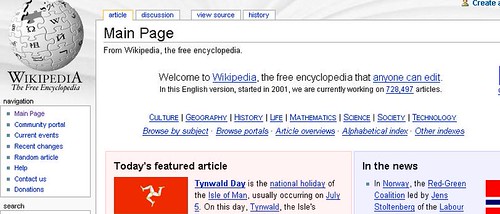
Wikipedia is both very handy and an excellent demonstration of how the Web radically extends communication, as compared to print.
wikiped
As you can see in the screenshot above, Wikipedia is a “free encylopedia that anyone can edit” – an awesome claim for those of us educated in the pre-Web era. In Wikipedia’s Introduction it says:

Wikipedia is an encyclopedia written collaboratively by many of its readers. Lots of people are constantly improving Wikipedia, making thousands of changes an hour, all of which are recorded on the page history and the Recent Changes page. Nonsense and vandalism are usually removed quickly, and their creators banned.

So people from all over the world, and in many languages, can add to and edit entries in Wikipedia.I find that amazing! Instead of paying USD $1495.00 for the current Encyclopaedia Britanica, you can use Wikipedia for free.

“But what about its quality?” teachers and others ask. If it’s free, and created by anyone who feels like contributing, can it possibly be accurate?

Here is a section from a longer entry describing Wikipedia’s reliability:

The German computing magazine c’t performed a comparison of Brockhaus Premium, Microsoft Encarta, and Wikipedia in October 2004: . Experts evaluated 66 articles in various fields. In overall score, Wikipedia was rated 3.6 out of 5 points (“B-“), Brockhaus Premium 3.3, and Microsoft Encarta 3.1.[38] (#wp-endnote_Kurzidim) In an analysis of online encyclopedias, Indiana University professors Emigh and Herring wrote that “Wikipedia improves on traditional information sources, especially for the content areas in which it is strong, such as technology and current events.”[39] (#wp-endnote_EmighHerring)

A good analogy for understanding the strengths and weaknesses of Wikipedia’s approach can be seen in looking at the difference between the standards of courtroom and investigative evidence. The fact that Wikipedia can be edited by anyone makes it difficult to claim it can be trusted with the same degree of certainty as one would expect from courtroom evidence. However, its openness to broader base of contributors allows it to achieve breadth and depth of creativity and connections that make it ideal for learning about and investigating ideas, similar to the way in which the more liberal use of investigative evidence can lead to important leads and further evidence that could have been strangled by applying the rigid standards of courtroom evidence.

http://www.answers.com/topic/wikipedia
Notice that in the comparison, Wikipedia got 3.6 out of 5 points (“B-“), while Brockhaus Premium got 3.3, and Microsoft Encarta 3.1. Wikipedia scored higher than Encarta!

So if you want to find information on a specific topic, you can use keywords (“Single terms or short phrases that best define the main points of your topic. Keywords are used for searching catalogs and databases.” http://www.lib.unc.edu/instruct/manuscripts/glossary/#k) in Google and sort through the thousands of hits, or you can go to Wikipedia and get clear specific information that is reasonably trustworthy. Check it out!

tags