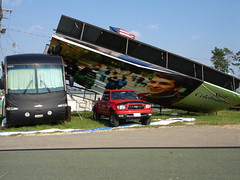
Imagine – if you owned Leatha’s Barbeque – what finding out – from the caption of this photo (from Deep Fried Kudzu’s photoset on flickr) – that your restaurant was undamaged. That’s the power of the social aspect of the Web.
tags
from Flickr
Figuring Out Life While Aging

Imagine – if you owned Leatha’s Barbeque – what finding out – from the caption of this photo (from Deep Fried Kudzu’s photoset on flickr) – that your restaurant was undamaged. That’s the power of the social aspect of the Web.
tags
from Flickr
This from FLOSSE POSSE, a blog on Open Source software for education.
By Teemu Arina – writing about the impact of 9/11 on the development of blogging, and comparing it to the potential development of wikis after Katrina –
This might be a turning point for wikis that sets the wiki revolution free. There are many free tools and many of these tools are so easy to use that anyone can use them. Wiki is one of them. The method of Open Source is the enabler and useful applications like collective distributed disaster help are cases that push it forward.
But as much as these easy-to-use and cheap social tools are useful for large disasters, so are they scalable for a single organization and their own little catastrophies, be it a community of schools, a medium-sized company or a multi-national organization.
Plus
To support a business practice in events of failure, we need a bottom-up collective distributed social system to help people to get things done with peer-help instead of straining those who hold the strings. Social tools like wikis, blogs and social networking might as well be the partial bottom-up answer to these communication problems, not a top-down intranet.
This applies to learning as well. If you don’t have a formal way to solve a problem, you will use your informal network of peers to find a way to overcome what you have in front of you. Your knowledge is not necessarily anymore in your head, it’s distributed in your social network and you are beginning to scratch those digital tools that will help you to use it as an extension to your own thinking.
Just like the social aspects of furl, and of flickr allow a new, more grassroots, peer, democratic form of sharing, so do wikis, which I will explore more in future posts.
I saw Flickr‘s icon shown in the tv news reports after the London transit bombings. Flickr is a photo sharing site where I have an account.
I’m not so sure that a picture can always replace 1000 words, but I am sure that we humans respond strongly to images. Flickr is a photo sharing site which I have an account on where I can store and publish images. There are other photo sharing sites, but Flickr is the best known one currently.
I use it for two reasons
 This is my avatar or personal icon. I used Flickr to add it, and I can use Flickr to add images to any Website by simply copying & pasting the HTML code that Flickr produces. I don’t have to know HTML code; I just have to know how to copy and how to (and sometimes where to) paste.
Adding pictures to Websites is important not just because it adds visual interest, but mainly because I use a lot of screenshots in my teaching. If you look at the post below, you will see a screenshot of a page in my Furl archive.
Here is a screenshot of the Flickr page with the HTML I copied to add my avatar image, above, to this post.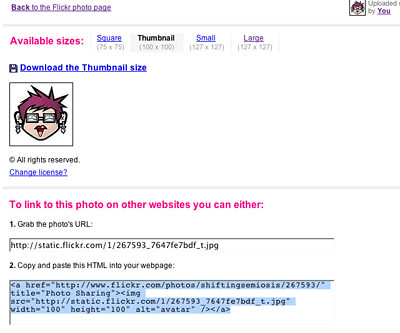
Notice, near the top, that I set it thumbnail size; the screenshot above is set to medium. Near the bottom, you can see, still highlighted, the HTML I copied & pasted into this post.
I change my screenshots into jpegs before I upload them. In Windows, I use a very easy, free utility called Paint, which is found under Start, under Programs, then Accessories. On the Mac, I use Photoshop, which I don’t know much about, but if you open your screenshot in it, you can use “Save as” to change it to a jpeg.
Sometimes I insert a screenshot into a Word document so I can add arrows or words. See the screenshot below, with the grab handles showing.
I wanted to use an arrow – pink and near the top – so I could point out that I use “All Sizes” rather than “Blog this” so I can control the size of the image.
There are many other aspects to Flickr which you can explore yourself. Its social aspect is similar to furl’s. You can see the images other people have saved – if they made them public. You can keep your images private, or designate who will see them. Tomorrow I plan on uploading to Flickr some old photos my Mom and Dad let me scan, so just my maternal cousins can see them. I will tag them using the family name.
To return to the beginning, Flickr appeared in the tv news after the London transit bombings because people who were involved in them, and had cameras of any sort, could upload their photos to Flickr. I expect they tagged them with words suggested by the police and/or the police looked for likely tags. Thus, in a very short time, the police had a flood of photos to help them sort out this crime. Beyond the sharing of photos, Flickr, as part of the social web, allowed citizens to provide vital information to the authorities. This is a radically new way to witness!
I first discovered and explored online social bookmarking to make my life easier – and it has. However social bookmarking is more than just a personal convenience. Social bookmarking tools, such as del.icio.us, are personal knowledge management tools that have at least two significant impacts. In the rest of this post, I will
Why I use furl
I teach in an institution that has students on laptops, and am issued a laptop to use to prepare my lessons for the Web. As circumstances change, the school will recall a certain model of laptop and issue another. I find changing from one laptop to another annoying, and used to struggle with saving and re-loading my bookmarks.
Plus, sometimes I use another computer, and I used to get frustrated because I didn’t have access to the sites I’d bookmarked on my school laptop. I first read about furl in Stephen Downes’ OLD newsletter, which I subscribe to. The online bookmarking tool he described sounded like a way around my bookmarking frustrations, so I looked furl up on Google, and set up my own account. I have become, as you can see, an enthusiast.
Online social bookmarking makes it easier for those with limited access to online computers to set up their own knowledge management tools. For those who don’t own a computer and/or have one in their home, setting up computer-based bookmarks is not possible. When people access online computers
,
they can still have their own set of saved URLs. The situation is similar to the use of online mail tools, such as Hotmail, Yahoo Mail, etc. Once a tool is online, any computer allows contact with individual’s accounts.
The Social Web
The Web is a new communication tool that operates very differently from print. When you use an online social bookmarking tool, you are sharing your research, and you can benefit from others’ research too. This is done in two ways.
When you bookmark a URL, you can label it private, make it accessible to people you choose, or leave it public. If you keep your collection, or part of it, private, it’s like a library in your home. If you make it accessible only to certain people, it’s like the reserves in a library. If you leave it public, it’s a bit like wandering in the stacks. Except in all these cases, you chose who the URL is available to.
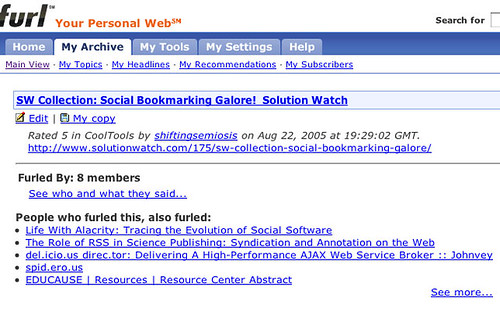
As you can see in the screen-capture above, when I click on the link I saved in furl, I get a list of links on similar topics bookmarked by others. I am browsing in the “stacks” of all the people saving URLs in furl. I am part of a community of knowledge managers, and I can benefit from their searching, and they can benefit from mine. This sharing among strangers, linked by their interests, is a very powerful aspect of the Web, and one of the reasons it is sometimes called the “social Web“.
Someing called tagging is part of this, but I’ll leave that for a future post.

Do you ever have to change computers? And struggle saving your Bookmarks or Favorites files?
Or do you use a different computer at home from at school or work? Tired of not being able to find a site you know you bookmarked or added to your favorites because it’s not on the computer you’re using?
What you need is an online social bookmarks manager. Here are two free sites that allow you to save links online. Both furl, the one I use, and del.icio.us are widely recommended. Both are easy to set up and maintain.
Once you create an account, you can begin saving links to the sites you might need or want in the future and you’ll never have to save and then reinstall a Bookmarks or Favorites file again.
I will be posting information and links aimed at helping teachers discover (mostly) free web tools that they can use to support their preparation and teaching. It will (eventually) be available for aggregators with an RSS feed. (If you didn’t understand the previous sentence, all will be explained over the next month.)
I plan on posting once a week.
 Learning Living