I have been inspired by reading danah boyd’s It’s Complicated to think about how we all, not just teenagers, behave, and perceive ourselves behaving in our digital environment.
Getty Offers Copyright Safe Images
Responding to @dougpete, I’m adding some more information about copyright safe practices, this time with images. As described in the previous post on safe sounds for podcasting – https://joanvinallcox.wordpress.com/2014/02/28/safe-sounds-for-podcasting-canada-2014/ – Creative Commons and, using Creative Commons licenses, Flickr, provide copyright safe images. On Google Images, you can find safe content, if you search under Tools.
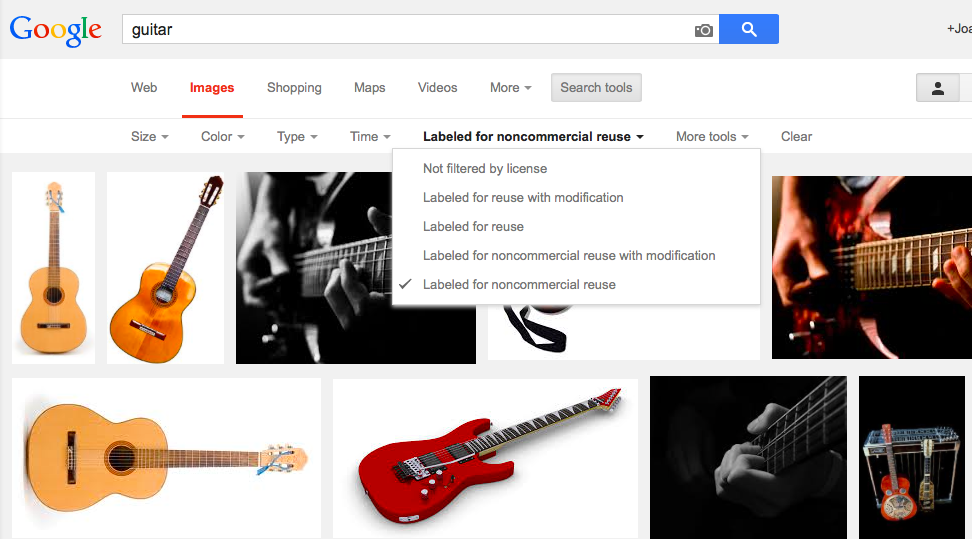
However, the exciting and savvy new move by Getty, as described by CNN – http://www.cnn.com/2014/03/06/tech/social-media/getty-free-pictures/ – adds more options for images to use, at the same time as making misusing the images using screenshot etc. far less interesting. All Getty asks is that you embed the image, giving them credit and a link back to their site.
The embed icon looks like – </> and takes you to the code.
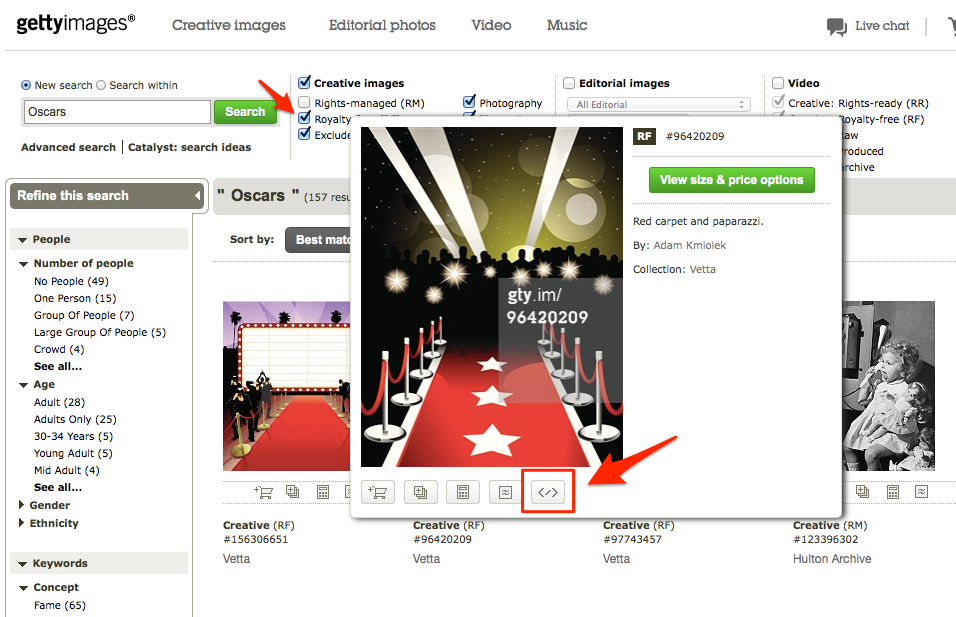
And this is what you get –
Safe Sounds for podcasting – Canada, 2014
Learning by Playing Around
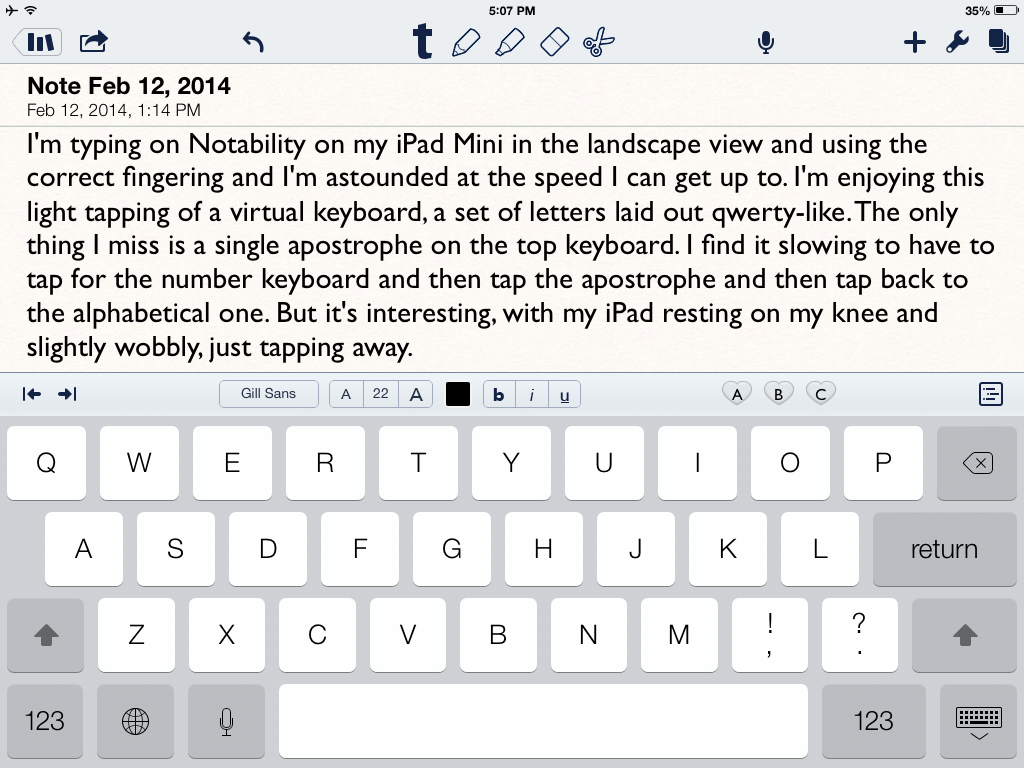
I’m typing on Notability on my iPad Mini in the landscape view and using the correct fingering and I’m astounded at the speed I can type with. I’m enjoying this light tapping of a virtual keyboard, a set of letters laid out qwerty-like.The only thing I miss is a single apostrophe on the top keyboard. I find it slowing to have to tap for the number keyboard and then tap the apostrophe and then tap back to the alphabetical one. But it’s interesting, with my iPad resting on my knee and slightly wobbly, just tapping away.
I’m hungry and I’m playing a little. I just found out that I can type a small “i” and it will automatically turn into uppercase. If I type “im” it will automatically become I’m. I wonder what will happen when I type “its”. Yup, it converts; it’s given an added apostrophe automatically. I had to use a semi-colon to need to get at the numerical keyboard. Good to know.
Hearing Winter
I’m hearing this a lot lately –
Wild Sound 1
I’m playing with recognizing sounds – guess what this one is:
The biggest predictor of career success? Not skills or education — but emotional intelligence
Student Presentations Videoed
When my students make group presentations, I like to offer them a video of their performance to supplement and strengthen my feedback to them on what they did well and what they need to improve. Today, with the help of a student videographer and the iPad app Capture, I found an easier way to give them access to their video.
First, because their presentation was longer than 15 minutes, I had to prepare my YouTube account to accept that. On the advice of a student, I went to https://support.google.com/youtube/answer/71673?hl=en to find out how to do that. Once I had verified myself with my phone number, I was allowed to upload longer videos to YouTube. So then it was time to video their presentation. I handed my iPad with the Capture app to a student and she used it to video the presentation.
I have used videos before, but I always found porting the video to my computer and then uploading it to YouTube or Vimeo took many times longer than the video itself. I found it onerous. This time, I received my iPad back from my student videographer, and clicked “Upload”. This is the screen I saw:
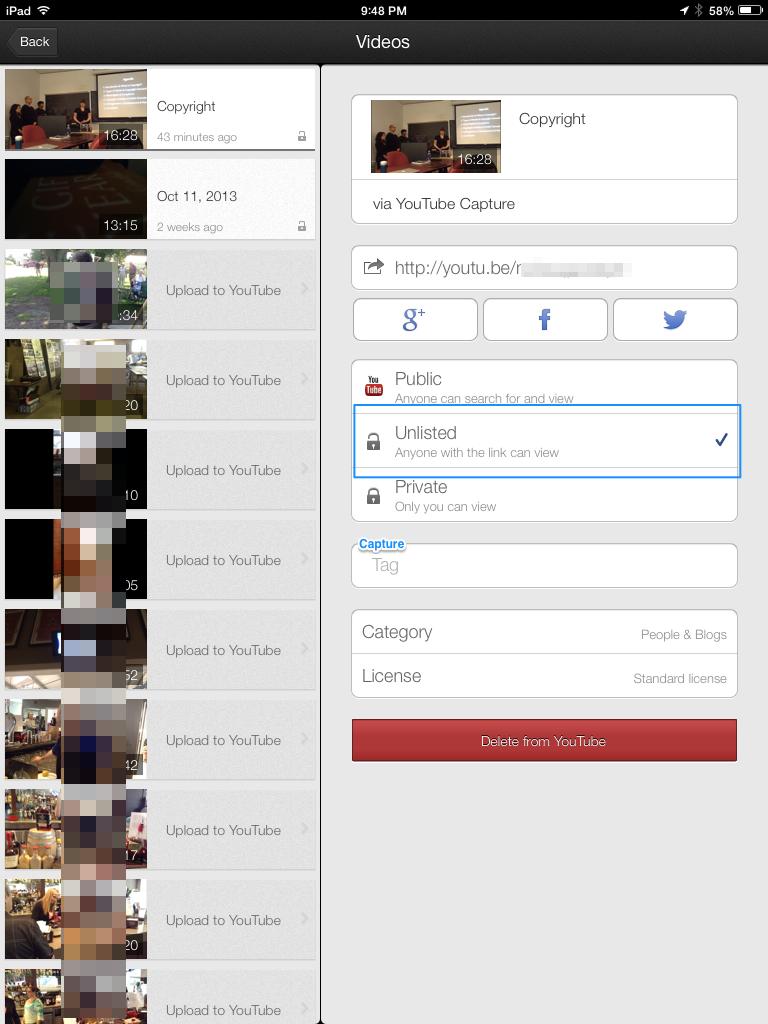
I chose the “Unlisted” posting, to give students their privacy. Only those with the link will be able to see the video. I use Wikispaces for my course container, and simply posted the link to the YouTube video of their presentation in their Project page, which only members of the group can access. I could have simply emailed the link out to them. Either way, they have control of the privacy level of their video. They can share the link, or not.
This process, using an iPad with the Capture app which is linked to YouTube, is so much easier than my previous process of uploading videos of student work, and I can give them privacy.
Dyscalculia
I’ve just read a very interesting post on a version of dyslexia that deals with numbers – http://www.bdadyslexia.org.uk/about-dyslexia/schools-colleges-and-universities/dyscalculia.html and now I understand a lot more about how my mind works, and doesn’t work.
I have trouble with left and right, and trying to read maps is painful and embarrassing. I also switch numbers (1,2,4,3,5 etc.) if I try to read them quickly. I have to be VERY careful with large numbers as I can confuse 1000 with 10,000, etc. Plus it’s very hard for me to remember telephone and other numbers, even dates in history. So I think I have dyscalculia. I am also mildly dyslexic, and have some trouble with spelling, but I love words and writing. Despite those limitations, or maybe because of them, I’ve been told repeatedly that I’m a good teacher, good at helping people learn.
I am deeply grateful that I was able to learn and develop tactics that allowed me to survive and thrive as a student and as a teacher. Both as a teacher and as a learner I have observed that people often don’t remember how they learned something; we just own and use what we’ve learned and move on. So I can’t remember how and from whom I learned my tactics for surviving my weaknesses by adapting my strengths to cover for them. The only way I can express my gratitude is to show others alternate learning and performing routes that might work for them. And share with everybody what I learn about how our human minds work, and how differences in how they work can be dealt with compassionately.
Giving people the space and opportunity to learn how they learn, and how they can deal with their weakness as well as their strengths is not only wise and kind, it creates a better world for all of us.
If you are reading this and think you might be dyscalculic, check out your sense of self-worth and see if you have learned to focus on adaptations to help you survive, or if you dwell too much on what you struggle with. Perhaps you need to acknowledge how hard you work, as much as what you can’t do easily. To boast and inspire, I eventually got my Ph.D. and posted my thesis on line – http://www.scribd.com/mobile/doc/2063617 and here’s my not quite up-to-date e-portfolio – https://joanvinallcox.wordpress.com/my-e-portfolio/
Mapping the Wilderness
To sample a poem from my recently published collection – available from http://www.blurb.com/b/4591664-mapping-the-wilderness – listen to me reading –
Approaching Sixty, I See That … https://soundcloud.com/joanvinallcox/at-midlife-i-see-that – Hope you find it meaningful, and perhaps buy a copy of my collection.
Courage at eighty is different from at twenty
But both ages carry their future constantly –
A fearsome thrust into an unmapped wilderness.
To carry your future at twenty is to seek
The wilderness because it must be mapped
And shaped. There are roads to clear and homes
To build, and no one has given you a plan
For your wilderness, (just the one they didn’t use in theirs).
So you thrust forward, knowing too little and enough,
Building blindly wherever you find a clearing, lifting
The log of your childhood so it bridges your fears,
Confident that it might not collapse on you.
A fearsome thrust carrying life forward blindly
At eighty requires enough love to endure
Despite loss, and endure because of loss to come,
And endure because of the sweetness still here, if
Courage persists. And, despite (because?) the compass pointing
Through the wilderness to the edge of the map,
Tells a tale seen over and over about endings, despite this,
To work through today knowing
too much, and not enough, about tomorrow.
Courage at eighty is different from at twenty
But both ages carry their future constantly –
A fearsome thrust into an unmapped wilderness.
 Learning Living