https://player.soundcloud.com/player.swf?url=http%3A%2F%2Fapi.soundcloud.com%2Ftracks%2F30655697&show_comments=true&auto_play=false&color=70368e Christmas After Bereavement by joanvinallcox

Figuring Out Life While Aging

Midwinter is a time of darkness, a time when the light lessens and disappears, a time when we mix hope and fear. The worldly powers compel many, but not every detail of our lives. We can, as this Christian story asserts, face our lives with faith, with belief that out of our struggles, meaning will emerge.
This was to fulfill what had been spoken by the Lord through the prophet: “Out of Egypt I have called my son.” – Matthew 2:15
by Joan Vinall-Cox
It was a dark time –
Mary had wanted to be glad
Joseph had chosen her
but that strange dream …
and old Elizabeth, swollen with child,
calling her blessed, saying a
Child was growing in her
too, yet she’d never…
except in that strange dream;
and she had swollen
and Joseph,
angry and sad and puzzled,
had planned to hide
her disgrace, but he dreamed
too,
and married her but slept
apart
and would not look at her.
It was a dark time.
It was a dark time –
the rulers had decided
to count them all where
their ancestors had lived
so Joseph and Mary must walk
for days, weeks, and her so
large and tired, and both so
puzzled and hopeful and fearful.
Could the Holy One really have chosen
them?
Still they must walk,
as the rulers
demanded, in the cold,
in the darkening time, they must
walk into Bethlehem, this ancient
town, filled with others obeying
the rulers who wanted to count them and did not care
about walking, or a room for a
young woman with her time
pressing on her,
with the Holy One’s Gift demanding
His time on earth,
and no room for this family
It was a dark time.
There was light at His birth –
light in Mary’s eyes and
light in Joseph’s smile and
light flowing out, pulsing out
around the wondrous Child
light that brought the amazed
shepherds,
and star light that
brought the Wise Ones from
afar to worship
Him
and light that the eyes in
the dark could see, whispering to
a man with too much power
that he was nothing
beside such Light,
and the Holy One sent another
dream to guard the Light, to
hide it in a foreign land
and Mary and Joseph fled
into Egypt, carrying the Light
away from the darkness of
Herod’s massacre of babies.
It was a dark time.
It was a dark time –
waiting in a foreign land,
watching Him grow, and learning
patience and trust, waiting
for a new dream, yearning for
home
and then
out of the dark time,
the dream came.
With the rapidly changing web environment, much writing is ephemeral, and becomes lost in the past. This is a post I think worth re-posting, about the process of creating curriculum. Most of the links no longer work.

From 2006 –
Dreaming the Curriculum: Oral Rhetoric
This past winter term, I taught a course, Oral Rhetoric, a third-year university course, for the second time. The first time, I taught it using two-hour classroom meetings, once a week for the term. The second time I taught Oral Rhetoric, I used Web-tools to supplement the classroom time. This is the story of the impact of a community blog on Elgg, a course wiki on Wikispaces, and the audio-editing freeware, Audacity on this course. This is a story about Web 2.0, the Social Web, and learning.
My story begins, sort of, with my initially agreeing to teach Oral Rhetoric. The name caught my imagination, because, as an English teacher, I had studied “oracy”– the practice and impact of speaking, – and I liked teaching people how to speak well and powerfully. I taught both theory and practice to the students in the first iteration of this course. Most of them learned more about how to speak, a little linguistics, and some theory about language and speaking. But when I planned to teach Oral Rhetoric a second time, I began to dream up some changes. (I rarely teach exactly the some material exactly the same way twice, because I learn something from each class, and I am constantly learning more about communicating.)
Another beginning to this story is tangled up in my belief in teaching from the past and into the future. When I planned the most recent iteration of this course, it was 2005, the year that the word, “podcast” was declared Word of the Year. The Web, and Web 2.0 in particular, had implications, I believed, for oral rhetoric, as did Aristotle’s work, Walter Ong’s theories about “secondary orality”, Deborah Tannen’s research on linguistics, Marshall McLuhan’s concepts about the impacts of the media, and, of course, the digital generation’s facility with the online world. I resolved to use the communication tools that are evolving in our culture as part of this course, because that would support an understanding of the craft of speaking (and communicating) as it is developing online today.
I would teach cultural roots and, using theory and practice (which includes technology), create a learning environment where students could build a foundational understanding that would allow them to extend and develop their learning into the future. My ambition was to have students understand the power of communicating using the physical voice in a variety of modes, from face-to face to media-delivered situations. I wanted them, in our media-saturated environment, to understand how media alters the impact of individual voice communications.
I decided to focus on storytelling, formal presentations, a requirement to be filmed, so they could see and hear themselves speaking, and the creation of an audio file (an mp3) of their story to be posted online. I wanted them to understand, as speakers and listeners, on a visceral as well as a theoretical level, how the physical voice communicates. My research evolved out of what I was already studying: Aristotle, Havelock, Ong, Farb (Word Play) Tannen, McLuhan, and, of course, Web 2.0. (I had been building my knowledge in these areas for years, using fascination, work assignments and graduate studies.)
As I began developing my upcoming iteration of Oral Rhetoric, I, almost accidentally, set up a situation that came to inspire me to take early retirement. When I was presented with a fulltime work assignment that was uninspiring and unattractive to me, an assignment that might interfere with teaching this part-time course the way I wanted to, the way I believed was most valuable to the students, I baulked. After a brief review of my situation, I decided to leave my long-term fulltime employment, and focus on this part-time teaching, some tutoring, and consulting on educational uses of Web 2.0.
My focus on planning Oral Rhetoric intensified. I am an elder in the field of education, both in terms of my hands-on experience and my studies. I have been teaching for the great majority of my working life, over 35 years. During that time I have studied, both formally and informally, how people learn to write, read, and communicate. I have also studied, both theoretically and through my teaching practice, how people learn. I know a lot about pedagogy (or androgogy) and curriculum theory, but I don’t think and plan using theories directly, except sometimes as final checklists after planning. As a teacher, I intuit, I use my tacit (Polanyi) know-how about what will help people learn. I have learned the theory, and use it, but I don’t label what I’m doing with it. (For me, planning is like dancing, and, in dancing, if you think directly about the moves, you become clumsy.) At this stage in my career, I design and plan by imagining, by almost feeling how something will work for learning. I get indistinct ‘senses’ of what is possible and develop them by talking and/or writing about how and what I want to teach.
While planning Oral Rhetoric, I talked to my husband, Jim Cox, also a career teacher. Our rich conversation has extended years as we discuss, in phenomenological detail, with conceptual overviews, how we humans perceive and learn. I also discussed my ideas with Guy Allen, the head of Professional Writing and Communications at the University of Toronto in Mississauga, the program hosting Oral Rhetoric. (I had read Guy’s work on how people learn language developmentally (Allen, 2002) and audited him teaching the required introductory course and I was delighted to be teaching in a program with a pedagogy that matched my experiences and understanding of how people learn language.) In particular, Guy’s suggestion of using the CBC program, Outfront, became central to my thinking about Oral Rhetoric.
The other place where I got help was online, both in my ongoing survey of the blogosphere, focussed on education and technology, and through my Elgg blog. I searched and read about podcasting wherever I could, but found it technologically intimidating. Although I have taught myself enough html to be able to add bits to my blog sidebars, and copy and paste RSS feeds into my Bloglines account, I am not from a technical background; I am from a communications background. I knew about Audioblogger, and had played with it, but I wanted something more sophisticated. Somewhere online, I read about Audacity, a free, downloadable application for recording and editing sound. It had very positive reviews, so I downloaded it and began playing with it.
My husband had taught audio, and although he wasn’t familiar with Audacity, it resembled other (more sophisticated) audio recording and editing applications enough that, between him and the online tutorials, I created my very own mp3 of myself lecturing. Somehow, I can’t remember clearly how, I realized that I could use Elgg blogs to post mp3s, and you can see and hear the result here – a rather dry recording. When I listen to it after hearing the work my students did, I would give my recording a ‘D’. But what was central was that if I, a non-technical “digital immigrant” could create and post an mp3, I reasoned that my students, “digital natives”, could surely do the same. And if any of them couldn’t, for sure they would be able to use a phone, which is all that is required for Audioblogger. I explored the Elgg site a little more and discovered “Community blogs”– where I could set up my class so all the members could post in the same blog, and add their mp3 assignments.
I needed one more technical component. With blogs, postings are chronological with the most recent at the top. With wikis, pages look like a regular Web site, but you can create and edit them online, without using html or ftp. I had used a wiki application in a previous course, JotSpot, when it was in beta (or development) and free. It was visually attractive, and as easy as using a simple word processor, but no longer completely free. (Free Web applications are handy because students can download them on their own computers, and because teachers don’t have to ask for funding, i.e. permission.) After some exploring, I found Wikispaces, which was free, if you accepted the ads along the side, and WYSIWYG (“What you see is what you get”) meaning little technical learning was needed. So I had the technology and some of the ideas lined up, but I needed more thinking. So I wrote in my personal Elgg blog, imagining students as my audience I found the feedback both affirming and helpful. It was time, and I was ready, to open a calendar and a calculator and begin the onerous task of planning what assignments, worth how much, and when due. The dreaming was mostly (but never completely) past and the intensive planning was next.
I will post on those specifics in a few days.
Works CitedAllen, G. (2002). “The ‘Good Enough’ Teacher and the Authentic Student”. In J. Mills (Ed.), A Pedagogy of Becoming (pp. 141 – 176). NYC: Rodopi.

My experience teaching university students has led me to believe that they don’t know enough about how to attribute images that they haven’t created themselves. From my own experience as both a student and a teacher, I am familiar with applications that make creative bibliographies much easier (BibMe, EasyBib, etc.). I am also familiar with what happens when it’s easy to correctly create bibliographies and citations; I (and others) are much more likely to make sure we’ve give credit where credit is due.
So I was delighted to read Judy O’Connell’s description – https://heyjude.wordpress.com/2011/04/22/greasemonkey-and-flickr-for-the-adventurous/ – of how to get images from Flickr that have Creative Commons licensing, and are totally easy to attribute.
The image above was my experiment, and, as you can see, it worked. Now it is easy to find free images in Flickr and correctly attribute them. I strongly recommend her post – https://heyjude.wordpress.com/2011/04/22/greasemonkey-and-flickr-for-the-adventurous/
I don’t know if I did it “right”. I turned off all my lights and my computer, but I didn’t unplug the microwave, or the clocks, or the tv (though it was off) but we had a candle lit and our wood stove going. most people on our street appeared to have lots of lights on, so we were maybe a bit better. It was lovely, though, to sit by the fire, with candlelight and just talk. We should do that more often.
So far my favorite discovery in Firefox 4 is the App Tabs –
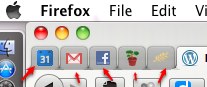
Each of the little red arrows point up to a “pinned tab” or a “app tab” residing to the left of the full tabs, and remaining there after Firefox has been closed and reopened. I can quickly and easily open my calendar, my mail, my Facebook, one of my wikis or the Hunger Site I like to click on every day.
I add an app tab by right clicking (or 2 finger clicking) on the tab I want to “pin”, like so,
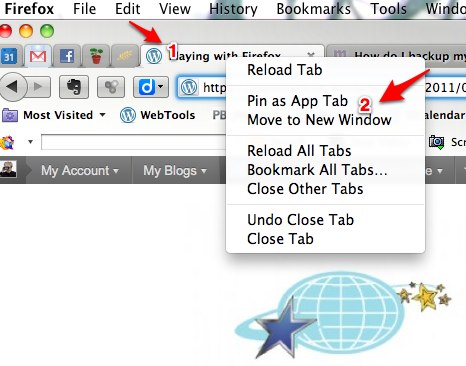 and then clicking on “Pin as App Tab”. Couldn’t be easier!
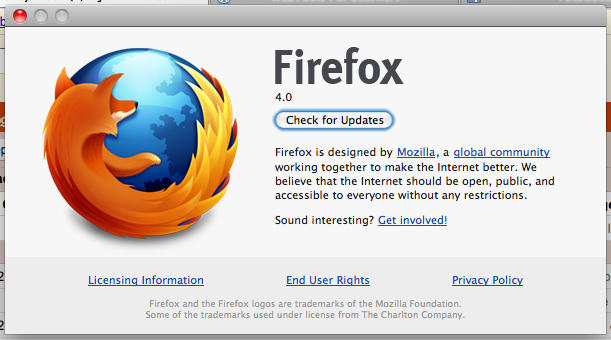 Check it out –
This poem is the truest account of the problem with marking in a system where learning is supposed to occur!
An excerpt –
I read the name at the top
and think of the young person whose effort this is.
Now all I see on the paper
is a face, crestfallen when I hand back what they attempted.
by Tom Wayman
Click the link below for the whole poem.
 Learning Living