Engrade – A Wonderful Teacher’s Tool


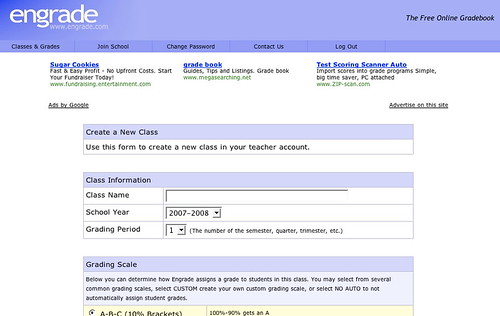
Engradehttp://www.engrade.com/ – is a wonderful teacher’s tool. If you want to share marks with individual students privately online, and aren’t on a Learning Management System like Desire2Learn, Moodle, or BlackBoard/WebCT, Engrade is just what you need. With Engrade you can post your students’ marks, and they can use the password you assign individually to see their marks. Plus you can then download your class records into an Excel worksheet and save them there.

It’s free and straightforward. You set up a class, add the students’ names, and give them their own individual password, (I did that by email). When you’ve finished marking an assignment, you add the marks to Engrade and make them accessible.

I used it with my 3rd year university students last term and it worked just fine. They checked their marks, I got some emailed queries, but I simply answered those, and found it far smoother than discussions about marks in class. Some after-class conversations still happened, but most students were happy with the system – if not the marks ;->

The best thing was that they had adjusted to their marks before they got their assignment or assignment comments back, and, when they got them back, could focus more on my feedback and less on the mark.

SlideShare on Blogging

I’ve mentioned SlideShare, the YouTube for presentations, before – http://elgg.net/vinall/weblog/134207.html  I like to browse it sometimes  and just read what I find. Dr. Steven Warburton has put up an interesting set of slides on student blogging – http://lookleap.com/slideshare.net/a1 – I recommend it, and using the full screen mode.

I found it quite interesting, a bit different from mine.

I used an Elgg Community Blog which gave my students some control over how public, or not, their post was, set topics, often based on current readings, and required they write in it for a portion of their marks. Oral Rhetoric was classroom based, but the frequent writing paired with personal icons, either their photos or a chosen image, created a kind of threading in which we could, with a quick glance, see who the writer was.

The setting of weekly questions scaffolded the students in learning how to use a blog, which many, if not most, were uncomfortable with, especially using it for an educational purpose. As I believe they will sometimes be using blogs for professional purposes in their futures, I wanted them to begin to understand that there are different genres of blogs, and different rhetorical approaches – which I’ve explored here,

I wrote up my opinion of blogs used as part of a learning / teaching strategy – http://elgg.net/vinall/weblog/145563.html  – I believe that that blogs can be used in many ways, and that they are especially important in creating learning communities.

technorati tags:,

Blogged with Flock

Free Applications for Education

From the blog  – AcademHack – http://academhack.outsidethetext.com/home/?p=51 – a list of tech tools for academics. The two I liked the looks of best are NeoOffice Aqua  – a free suite of office tools for Macs (For Windows, there’s OpenOffice, also free) and Google Apps for Education which is downloadable for free.

With Google Apps for Education, you can offer all of your students innovative email, instant messaging, and calendaring, all for free.* You can select any combination of our available services (see below), and customize them with your school’s logo, color scheme and content. You can manage your users through an easy web-based console or use our available APIs to integrate the services into your existing systems — and it’s all hosted by Google, so there’s no hardware or software for you to install or maintain. Find out more by reviewing detailed product information or attending an online seminar.

Google Apps for Education

I hope some educational administrators take advantage of this time-limited offer.

technorati tags:, ,

Blogged with Flock

VideoJug – How to do Just About Anything!

I was driving with the radio on, listening to CBC, and heard a description of a website called VideoJug that has short videos about how to do a wide variety of life necessities, and decided to check it out.

The videos I looked at are clear, short, easy to follow, and you can print up the instructions! Most are narrated with a lovely British accent, and the Aussie computer guys are funny.

Teachers might find it useful to show students how to give instructions clearly, and/or as a backup or reference to something they’re teaching. they might also find the instructions useful personally ;->

If you have a blocked toilet, or want to know how to use make-up to give yourself smoky eyes, or how to floss your teeth, or how to make a martini, just go to VideoJughttp://www.videojug.com/

technorati tags:, ,

Blogged with Flock

Convergence Learning & Class Blogs

Via Will Richardson – http://weblogg-ed.com/2006/more-henry-jenkins/ – quoting Henry Jenkins

In talking media pedagogies, then, we should no longer imagine this as a process where adults teach and children learn. Rather, we should see it as increasingly a space where children teach one another and where, if they would open their eyes, adults could learn a great deal. (Emphasis mine.)

Weblogg-ed » More Henry Jenkins

I used to have a page tacked to my bulletin board with a quote from Elliot Eisner – from a Google search, this reference – Elliot Eisner (in Saks (Ed.), 1996, p. 412)

“Working at the edge of incompetence takes courage.”

I thought this was true of all teaching, because we never know what our students don’t know, and how they can actually ‘get’ what we want to transmit convey help them learn. I also thought it was true of all teaching because, especially in rhetoric or English lit., my areas, views and rules change.

I also thought it was what made my learning, (and theirs) exciting. When you are at the vygotskian point in your proximal development that you mostly know and can venture into interweaving your own experiences and ideas into what you are getting from the mentor/experts (teachers, books etc.), it is terrifically exciting. Things click, synapses connect, and you are in a wonderful state of flow!

As a teacher, I can sometimes feel the class in this state, and I work to keep that liveliness happening. As a student, I am very good at helping move the class (if the teacher allows it) into a space where this is possible.

Last term I used an Elgg class blog with a 3rd year undergrad course in oral rhetoric, which I’ve blogged about before – here, and here. I’ve had trouble writing up a “final report” on my experience for two reasons.

  1. I had my students use Elgg and I feel (I think the best description is) shy. (Paranoia – “If they look, they will find it, anywhere on the Web, but they know how much I like Elgg, so they’ll know to look there.” Well, yes, but it is only my opinion and they are welcome to differ. I guess this is a trace of the Staff Room effect where you can say what you want, get as extreme as you want because you won’t be overheard. It’s also a bit of a response to the “Rate Your Teacher” effect. Time to get over that.)
  2. The Henry Jenkins quotation at the beginning of this post. I feel some ownership of the class, but they own their success. In their blog posts I could see how they began to expose where they needed help, and I could see some of their classmates helping.

Many of the students in the class began the interactive learning that I believe is the most powerful and natural way of learning. I set up the environment, but they taught one another. Those who were active with helping each other learned the most, and learned a pattern of learning that will benefit them the rest of their lives, I believe.

The best part for me, is how much I learned from watching them teach each other. Teaching and/or learning “at the edge of incompetence” is both exciting and valuable. And, with our rapidly changing and developing communication technologies, a necessity.

technorati tags:,

Blogged with Flock

Flock & Teaching/Learning

From Dave Tosh‘s Edufilter interview with Stephen Downes, Downes says –

In my mind, the browser is the LMS, and will continue to be the LMS. This is why I watch developments on the browser side, such as Flock, very closely.

edufilter

(LMS = Learning Management System)


This fall I will be encouraging my students, as I have been encouraging my JNthWEB clients, to  use Flock for their Web work. It is the Web 2.0 browser, aimed at the social user, perfect for a variety of communication tasks. In the screenshot above you can see

  • both the icon for connecting to a Flickr or Photobucket account and how it can be displayed;
  • the address bar’s blue circle with an embedded white star which allows you to add a site to your Favorites, and if connected to a social bookmarking account, like my del.icio.us account, to that, all in one click; and
  • The plume icon for the (WYSIWYG – see the Toolbar!) blogging tool and its window open and in use.

The other major aspect of Flock that I don’t use but am recommending to my students and clients is its aggregation tool for blogs and news sites you want to follow easily and regularly (in the icon bar between the photo and blogging icons above). I will continue to use my Bloglines account (second from the left in the tabs under the photo stream) because I am used to it and like its set-up.

Oh, and of course, its Search Field on the upper right which searches a variety of search tools and lets you choose which one you want this time.

Flock has, as you can see, centralized a number of important Web communication aspects all within itself as a browser. For someone just beginning to learn how to use the Web, especially the social aspect of communicating using Web 2.0 tools, Flock is a great browser to introduce both the concepts and the tools.

The education is not in the tools, but rather, in the use of the tools

edufilter

If people can learn the concept of what they can do, they are better off learning the open access free tools, such as Flock, than other over-specialized and over-complex systems that have limited uses. IMHO.

technorati tags:, ,

Blogged with Flock

Elgg Interviewed!

Elgg – social network software for education:
An interview of the founders of Elgg

I heartily recommend the Elgg Learning Landscape to any teacher and/or professor who wants to use blogs with their students. To learn more, you can click the link at the top to read an interview with Elgg’s founders. Elgg itself is both free and very user-friendly. I recommend giving yourself some time to explore it. I also suggest that, if you decide to use it, you ask your students to explore it and see if any can find aspects that you’ve missed. I’ve learned a lot that way.

What makes Elgg particularly recommendable – (Is that a word? Oh, well, you know what I mean.) – is that the individual user can set their own level of privacy for each of their own postings. Students can set their post as “Private” and no one, not even the Community Owner/teacher will be able to see it. They can also set it for just the community, or just the logged-in users of Elgg, or make it completely “Public” – at their own discretion. I like that (except when some students don’t understand “Private” and can be upset to get ‘0’ on their post) and the students like it. I sometimes am shy when I think about certain people reading what I’m saying. Although many of the student generation are very (too?) casual about who might be their audience, there are some that appreciate the “walled garden” approach to posting their thoughts on the Web.

Last term I used an Elgg Community blog with a class, and it gave me a view of how the class was working that I’d never had before. I gave a combination of guidance on what to post on and the language etiquitte required, and the freedom of their own casual ‘voices’ plus the freedom to go beyond the topic guidelines. What I got to see was their thinking, including problems, and, delightfully, how they were helping each other both think and accomplish assignments. I believe the Community blog encouraged more of a community experience for the class members. They were also required to use a wiki (on Wikispaces) and post their assignments there, which gave them a larger (and consequently more ‘real’) audience than just the teacher!

I also use Elgg for a blog of my own where I explore the pedagogical implications of this new communication medium, Web 2.0.

I am part of a more loosely-joined community. Elgg is designed so that I can designate other Elgg members as “Friends”. How I use that function is by clicking on “Friends Blogs” (see the menu bar in the image above under the forest and railway image) and I get to read an aggregated collection of the posts of the people I have designated as friends. Here’s what part of my Network page looks like:

You can see, above, some of the people whose blogs I follow. It was through Dave Tosh’s blog that I found the reference to the interview link that I started this post with.

And yesterday, I noticed the menu bar’s “Friends of” link and discovered who was connecting to my Elgg blog! When I checked out their profiles, I could see that we had interests in common, and added many of them to my Friends list. Thus I’m gaining a loose community of people interested in ideas, and possibilities that we can share.

As you begin to think about the fall and your teaching, I recommend you check out the possibilites of Elgg for your class and for yourself.

technorati tags:, ,

Blogged with Flock