
Summertime is playtime, and we’ve had record amounts of rain where I live, so my playing has been indoors. Here are a couple of tools I’ve been playing with.
Jing is a free and very easy screencasting tool. Because I’m thinking about Personal Learning Environments, that’s what I made this screencast on –
My problem is that by covering my full screen, I get a screencast the size of my full screen, which is too big. Twitter helped me get a partial answer. (I’m using TweetDeck because with it, I can see any replies immediately and I can separate the people I follow into different groups, for ease of following conversations.)
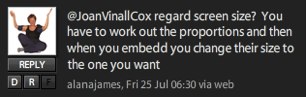
Alana’s advice allowed me to reduce the size of my Jing screen, but it only showed part of what I had captured. I wanted the whole image, but smaller. I have asked for help on Twitter several times previously and most often got a reply, so I consider it an important part of my PLE. It’s a place where I can ask and answer questions from peers.
So I’m playing, and thus learning how to use these tools, so when the weather is sunnier and/or I’m busier, I’ll be proficient and efficient in using them.
 Learning Living