A Wiki Showcasing Web 2.0 Learning Tools


releasethehounds – http://releasethehounds.wikispaces.com/ is a wiki aimed at teachers and showing what can be done, by teachers and by students.

Among the tools it showcases are VoiceThreads, – www.voicethread.com – YouTube, – http://www.youtube.com/watch?v=ZZfqOTWQCuA – and SlideShare, – http://www.slideshare.net/charbeck1/scribepost-119097 – all free and fairly straightforward to learn how to use. All both audio and visual.
Courtesy of the prolific and generous Stephen Downes‘s OLDaily

Another Brain Backup – Backpack

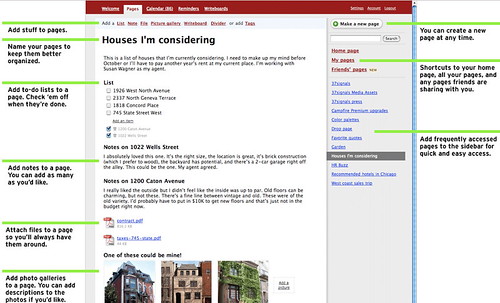
I have been using the free version of Backpack for years. It’s especially handy for reminders, where I can set up a reminder to be emailed to me regularly. For example, I get a monthly reminder to check my bank account so that an automatic monthly withdrawal won’t cause me to be overdrawn. I get my monthly reminder in my inbox, and I haven’t had to worry about forgetting since I started using Backpack.

Now it has some new stuff making it even more interesting and useful –
Backpack
http://www.backpackit.com/tour

This is a remarkably versatile and easy-to-use application, and I suggest you add it to your Bookmarks Toolbar, and make it part of your personal learning/work environment, i.e. keep it always handy!

I’m still playing with Jott, which I posted about yesterday, and have found some problems with it, which I’ll cover when I get a message back from them.

Jott – Another Fun Application

My friend, Bob Collings, sent me a link to Jott a new application still in Beta, that is very interesting. You phone their number, tell them who you want to leave a message for, including yourself, speak, and Jott emails your message to you or any of the contacts you’ve named. It is absolutely simple and requires no technical knowledge at all!


It’s good for reminders, to do lists, and recording ideas, as well as messages. I’m going to play with it and see how it works for me.

Mapping Wikipedia

Teachers who want a way of introducing their students to a new topic may find it useful to use WikiMindMap to create a mindmap to introduce the subject, and as a quick way of getting basic resources into the hands of students. Mindmaps are especially useful for visual thinkers and those starting to research an area. John Dewey is one of the most important writers on teaching and learning, in my opinion, so I put his name into the search box, made sure that I was using the English Wikipedia, and got this –

Under “Select a Wiki”, make sure you select “en.Wikipedia.org”; the default is “de.Wikipedia.org”, which finds German results. The green circling arrows are direct links, and the plus signs can be opened out for further links. At this point WikiMindMap is in beta.

I had a lot of fun seeing what I could find through it.

via Tris Hussey’s A View from the Isle

The Question of Wikipedia


The first time I heard about Wikipedia, I got really excited; I characterized it as a “world mind”.

I saw it as a place to share knowledge that anyone (with an online connection)could contribute to and/or benefit from. I confess I was initially impatient with, and disparaging of, those who told students not to use it. As the conversation about Wikipedia developed, I moved into the “use it to start researching, but don’t cite it” for my students, and “It’s an amazing source; check it out” for my friends and acquaintances.

I stumbled across Jon Udell’s screencast which gave me an understanding of how Wikipedia works; I highly recommend you take the 9 minutes to view it

After watching Udell’s screencast, (or instead of, or before) read danah boyd‘s short take on the importance of Wikipedia – http://www.zephoria.org/thoughts/archives/2007/06/27/knowledge_acces.html
I find myself in close agreement with her.

Wikipedia brings me great joy. I see it as a fantastic example of how knowledge can be distributed outside of elite institutions. I have watched stubs of articles turn into rich homes for information about all sorts of subjects. What I like most about Wikipedia is the self-recognition that it is always a work-in- progress. The encyclopedia that I had as a kid was a hand-me-down; it stated that one day we would go to the moon. Today, curious poor youth have access to information in an unprecedented way. It may not be perfect, but it is far better than a privilege-only model of access.

Too Funny Not to Share!

Remember Abbott & Costello’s “Who’s on First?” Here’s the digital version –
From Diva Marketing Blog, http://bloombergmarketing.blogs.com/bloomberg_marketing/2007/06/friday_fun.html thanks to A View From the Isle – http://blog.larixconsulting.com/blog

The scene: Costello calls to buy a computer from Abbot.

Abbott: Super Duper computer store. Can I help you?
Costello: Yes. I’m setting up an office in my den and I’m thinking about buying a computer.
Abbott: Mac?
Costello: No, the name’s Lou.
Abbott: Your computer?
Costello: I don’t own a computer. I want to buy one.
Abbott: Mac?
Costello: I told you, my name’s Lou.
Abbott: What about Windows?
Costello: Why? Will it get stuffy in here?
Abbott: Do you want a computer with Windows?
Costello: I don’t know. What will I see when I look at the windows?
Abbott: Wallpaper.
Costello: Never mind the windows. I need a computer and software.
Abbott: Software for Windows?
Costello: No. On the computer! I need something I can use to write proposals, track
expenses and run my business. What do you have?
Abbott: Office.
Costello: Yeah, for my office. Can you recommend anything?
Abbott: I just did.
Costello: You just did what?
Abbott: Recommend something.
Costello: You recommended something?
Abbott: Yes.
Costello: For my office?
Abbott: Yes.
Costello: OK, what did you recommend for my office?
Abbott: Office
Costello: Yes, for my office!
Abbott: I recommend Office with Windows.
Costello: I already have an office with windows! OK, let’s just say I’m sitting at
my computer and I want to type a proposal. What do I need?
Abbott: Word.
Costello: What word?
Abbott: Word in Office.
Costello: The only word in office is office.
Abbott: The Word in Office for Windows.
Costello: Which word in office for windows?
Abbott: The Word you get when you click the blue “W”.
Costello: I’m going to click your blue “w” if you don’t start with some straight
answers. What about financial bookkeeping? You have anything I can track
my money with?
Abbott: Money.
Costello: That’s right. What do you have?
Abbott: Money.
Costello: I need money to track my money?
Abbott: It comes bundled with your computer.
Costello: What’s bundled with my computer?
Abbott: Money.
Costello: Money comes with my computer?
Abbott: Yes. No extra charge.
Costello: I get a bundle of money with my computer? How much?
Abbott: One copy.
Costello: Isn’t it illegal to copy money?
Abbott: Microsoft gave us a license to copy Money.
Costello: They can give you a license to copy money?
Abbott: Why not? THEY OWN IT!
A few days later:
Abbott: Super Duper computer store. Can I help you?
Costello: How do I turn my computer off?
Abbott: Click on “START”

Another Wikipedia Evaluation

There are still people who think Wikipedia isn’t reliable, that people should be warned away from it. I think it is an utterly amazing example of collaboration, the creation of an external collective mind.

The Denver Post got 5 experts to evaluate articles in their areas of expertise.

The results? Four out of five agreed their relevant Wikipedia entries are accurate, informative, comprehensive and a great resource for students or the merely curious.

The fifth scholar called his chosen entry “not very good,” found some details to be inaccurate by omission, and said similar entries in more accepted encyclopedias like Encarta do their job better.

http://www.denverpost.com/entertainment/ci_5786064

For more details, including the University of Colorado history professor William Wei’s negative comments, follow the link to the article.

Booth, Michael. “Grading Wikipedia.” Denver Post 30 Apr. 2007. 2 May 2007 .

Link courtesy of Steve Rubel at Micro Persuasion