Another Brain Backup – Backpack

I have been using the free version of Backpack for years. It’s especially handy for reminders, where I can set up a reminder to be emailed to me regularly. For example, I get a monthly reminder to check my bank account so that an automatic monthly withdrawal won’t cause me to be overdrawn. I get my monthly reminder in my inbox, and I haven’t had to worry about forgetting since I started using Backpack.

Now it has some new stuff making it even more interesting and useful –
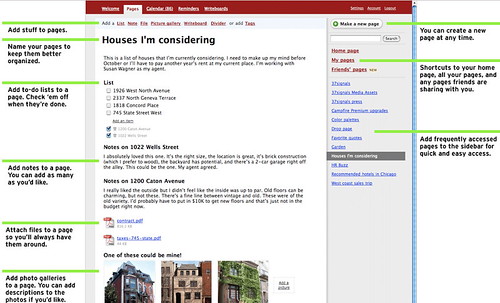
Backpack
http://www.backpackit.com/tour

This is a remarkably versatile and easy-to-use application, and I suggest you add it to your Bookmarks Toolbar, and make it part of your personal learning/work environment, i.e. keep it always handy!

I’m still playing with Jott, which I posted about yesterday, and have found some problems with it, which I’ll cover when I get a message back from them.

Jott – Another Fun Application

My friend, Bob Collings, sent me a link to Jott a new application still in Beta, that is very interesting. You phone their number, tell them who you want to leave a message for, including yourself, speak, and Jott emails your message to you or any of the contacts you’ve named. It is absolutely simple and requires no technical knowledge at all!


It’s good for reminders, to do lists, and recording ideas, as well as messages. I’m going to play with it and see how it works for me.

Mapping Wikipedia

Teachers who want a way of introducing their students to a new topic may find it useful to use WikiMindMap to create a mindmap to introduce the subject, and as a quick way of getting basic resources into the hands of students. Mindmaps are especially useful for visual thinkers and those starting to research an area. John Dewey is one of the most important writers on teaching and learning, in my opinion, so I put his name into the search box, made sure that I was using the English Wikipedia, and got this –

Under “Select a Wiki”, make sure you select “en.Wikipedia.org”; the default is “de.Wikipedia.org”, which finds German results. The green circling arrows are direct links, and the plus signs can be opened out for further links. At this point WikiMindMap is in beta.

I had a lot of fun seeing what I could find through it.

via Tris Hussey’s A View from the Isle

Canada and the Web

I’m Canadian, and I’m pleasantly surprised to see the Canadian stats and apps:


from the Read/Write Web:

Canadians use the Internet more than anyone in the world. According to comScore, Canadians spend on average 39.6 hours per month on the Internet, followed by Israel at 37.4 and South Korea at 34, while the USA is in 8th position with 29.4. Canada also leads in online reach with 70% of households having Internet access. The average pages viewed per visitor is 3800 in Canada, while the U.K. is second at 3300. And at 67%, Canada has one of the highest broadband penetrations in the world, 21 points higher than the US. Finally, while Canada still lags in online advertising, with $28.05 per Internet user and the US with $71.43, ad spending is expected to grow 32% this year (Ernst&Young LLP). So Canada is a sophisticated, and growing, market for Web apps.

As in any other country, Canadians heavily use Google, Yahoo and other global services like ebay and craiglist; each of which has their own english and french canadian localized versions. In social networking, Facebook is the star app of the moment. For instance, Toronto has more than 650.000 facebook users, more than the combined facebook users in New York, Boston and Los Angeles.

So Canada is still a communications leader!

The Question of Wikipedia


The first time I heard about Wikipedia, I got really excited; I characterized it as a “world mind”.

I saw it as a place to share knowledge that anyone (with an online connection)could contribute to and/or benefit from. I confess I was initially impatient with, and disparaging of, those who told students not to use it. As the conversation about Wikipedia developed, I moved into the “use it to start researching, but don’t cite it” for my students, and “It’s an amazing source; check it out” for my friends and acquaintances.

I stumbled across Jon Udell’s screencast which gave me an understanding of how Wikipedia works; I highly recommend you take the 9 minutes to view it

After watching Udell’s screencast, (or instead of, or before) read danah boyd‘s short take on the importance of Wikipedia – http://www.zephoria.org/thoughts/archives/2007/06/27/knowledge_acces.html
I find myself in close agreement with her.

Wikipedia brings me great joy. I see it as a fantastic example of how knowledge can be distributed outside of elite institutions. I have watched stubs of articles turn into rich homes for information about all sorts of subjects. What I like most about Wikipedia is the self-recognition that it is always a work-in- progress. The encyclopedia that I had as a kid was a hand-me-down; it stated that one day we would go to the moon. Today, curious poor youth have access to information in an unprecedented way. It may not be perfect, but it is far better than a privilege-only model of access.

A New Web Research Tool – Yoono

Text and image notes below video
I’m editing the shared post from my Yoono account because, although Yoono looks very handy for saving material found on the web, (text, images and video), it isn’t completely my fantasy.

  • You only get to see one section of my notes on my “buzz” on the Yoono demo page; I couldn’t select the whole “buzz”, just one individual “note” on the “buzz” to share.
  • I couldn’t drag the “notes” into the order I wanted; they appeared in the order they were “buzzed”.

Of course, I’m a completely new user so I may just have missed some of the information provided in the video and the text/image explanations.

In any case, it looks to be like a cross between del.icio.us and digg. I suspect it will be more popular among the digital natives than del.icio.us because of its ease of connection with MySpace and because it feels more like the social web aspects they are familiar with.

I suggest you take a look at it, and spend some time playing with it. (In my opinion, you can’t judge just from the demo; you need to play/learn, which is what I’m engaged in this morning.)

Art From Art!

500 Years of Female Portraits in Western Art
Web 2.0 art – it reminds me of a music video from years ago where faces continuously and rapidly morphed into others – “Cry” by Godley and Creme – read about it here

Too Funny Not to Share!

Remember Abbott & Costello’s “Who’s on First?” Here’s the digital version –
From Diva Marketing Blog, http://bloombergmarketing.blogs.com/bloomberg_marketing/2007/06/friday_fun.html thanks to A View From the Isle – http://blog.larixconsulting.com/blog

The scene: Costello calls to buy a computer from Abbot.

Abbott: Super Duper computer store. Can I help you?
Costello: Yes. I’m setting up an office in my den and I’m thinking about buying a computer.
Abbott: Mac?
Costello: No, the name’s Lou.
Abbott: Your computer?
Costello: I don’t own a computer. I want to buy one.
Abbott: Mac?
Costello: I told you, my name’s Lou.
Abbott: What about Windows?
Costello: Why? Will it get stuffy in here?
Abbott: Do you want a computer with Windows?
Costello: I don’t know. What will I see when I look at the windows?
Abbott: Wallpaper.
Costello: Never mind the windows. I need a computer and software.
Abbott: Software for Windows?
Costello: No. On the computer! I need something I can use to write proposals, track
expenses and run my business. What do you have?
Abbott: Office.
Costello: Yeah, for my office. Can you recommend anything?
Abbott: I just did.
Costello: You just did what?
Abbott: Recommend something.
Costello: You recommended something?
Abbott: Yes.
Costello: For my office?
Abbott: Yes.
Costello: OK, what did you recommend for my office?
Abbott: Office
Costello: Yes, for my office!
Abbott: I recommend Office with Windows.
Costello: I already have an office with windows! OK, let’s just say I’m sitting at
my computer and I want to type a proposal. What do I need?
Abbott: Word.
Costello: What word?
Abbott: Word in Office.
Costello: The only word in office is office.
Abbott: The Word in Office for Windows.
Costello: Which word in office for windows?
Abbott: The Word you get when you click the blue “W”.
Costello: I’m going to click your blue “w” if you don’t start with some straight
answers. What about financial bookkeeping? You have anything I can track
my money with?
Abbott: Money.
Costello: That’s right. What do you have?
Abbott: Money.
Costello: I need money to track my money?
Abbott: It comes bundled with your computer.
Costello: What’s bundled with my computer?
Abbott: Money.
Costello: Money comes with my computer?
Abbott: Yes. No extra charge.
Costello: I get a bundle of money with my computer? How much?
Abbott: One copy.
Costello: Isn’t it illegal to copy money?
Abbott: Microsoft gave us a license to copy Money.
Costello: They can give you a license to copy money?
Abbott: Why not? THEY OWN IT!
A few days later:
Abbott: Super Duper computer store. Can I help you?
Costello: How do I turn my computer off?
Abbott: Click on “START”